
Browser Fingerprinting: How Websites Recognize a Browser Without Cookies
Clear your cookies, reload a website, and you might expect to look like a completely new visitor.
Sometimes you do. Sometimes you do not.
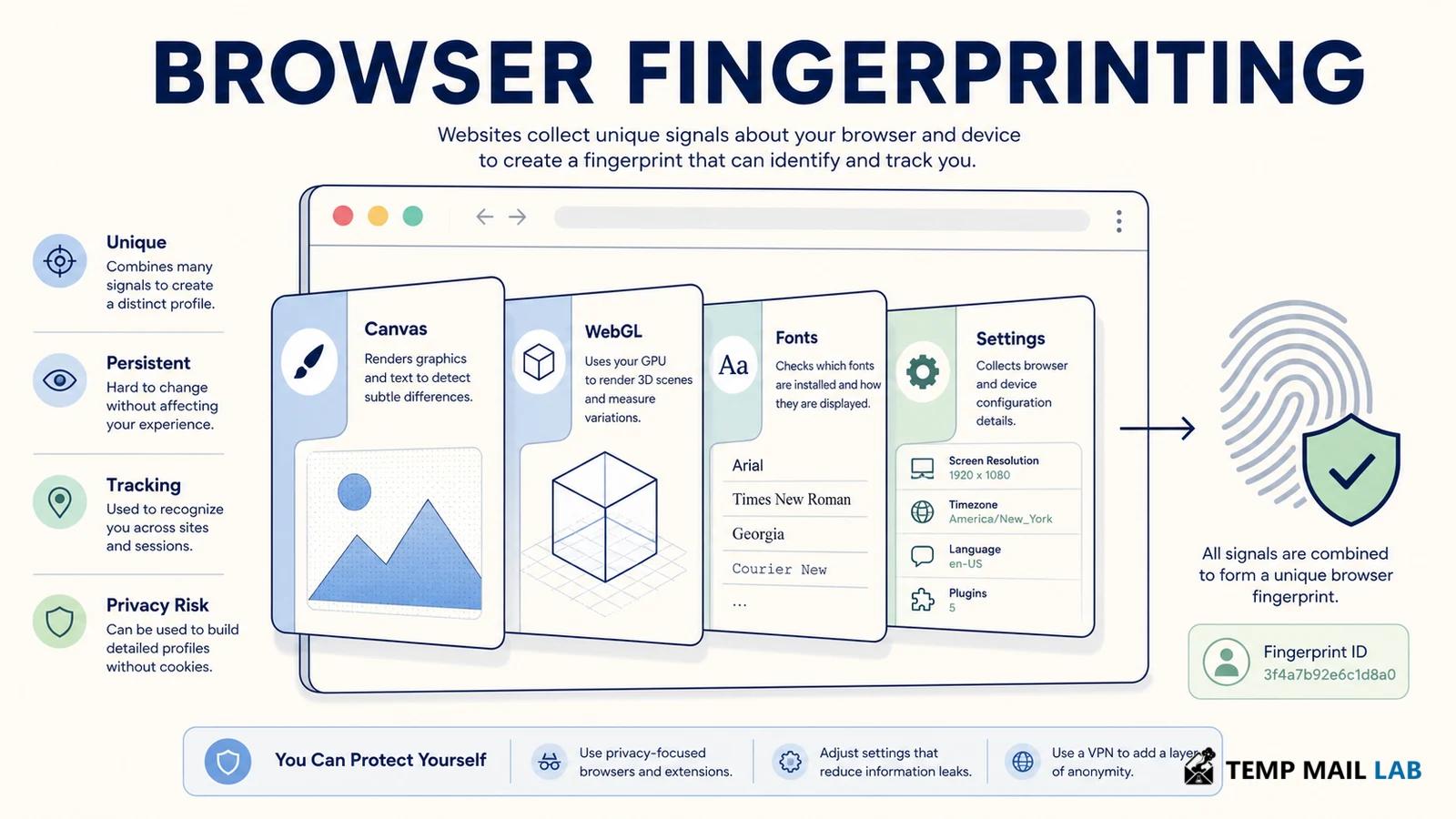
The reason is that cookies are only one way for a website to recognize a returning browser. Even without them, the browser still reveals a collection of technical details while it loads a page and runs its scripts.
A screen has a certain size. The browser has a language setting. Graphics are rendered in a particular way. Some features exist and others do not. The connection itself also carries information needed for the page to reach you.
Most of these details are not especially interesting alone.
Knowing that somebody uses English or has a 1920×1080 display does not identify them. But a website can look at several characteristics at once. If the combination is uncommon enough, it becomes easier to tell one browser from another.
That is the basic idea behind browser fingerprinting.
There is no universal fingerprint stored somewhere inside your laptop. A website observes whatever information is available to it, turns some of those observations into a profile, and may compare that profile with visits it has seen before.
Different websites can build different fingerprints from the same browser.
What can become part of a fingerprint?
The list depends on the browser and on what the website chooses to inspect.
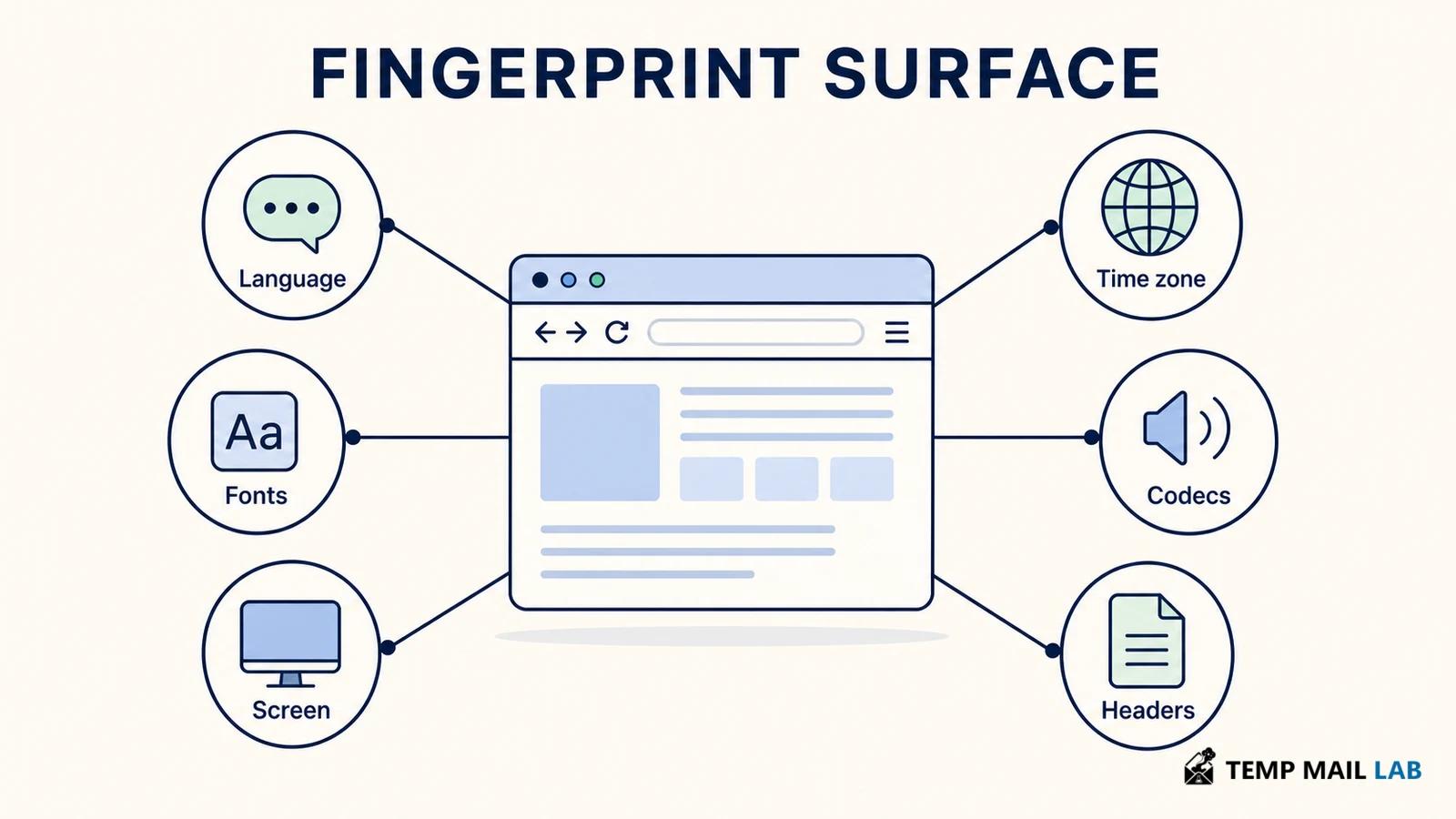
Language and time zone are common examples. Screen and browser-window dimensions can contribute. A site may notice touch support, device pixel ratio, supported media formats, graphics capabilities, browser features, fonts, or other settings.
Some information is already available while the page is being requested.
For example, the server has to deal with the network address from which the connection arrives. The HTTP request can also contain information the browser sends as part of normal web communication.
Other details become available only after the page starts running.
A script can check whether a particular browser feature exists, look at display measurements, or ask a graphics API to perform some work and inspect the result.
The W3C uses browser fingerprinting to describe the use of observable characteristics to identify or re-identify a user, browser, or device. Its guidance also discusses the difference between information exposed as part of ordinary communication and information gathered through active tests performed by scripts.
W3C fingerprinting guidance
What matters is the combination.
Take three very common details: Chrome, an English-language browser, and a standard laptop screen. Plenty of people will match them.
Add a less common graphics configuration, several unusual fonts, a particular time zone, and a few other browser characteristics. The pool of browsers that looks similar may become much smaller.
Fingerprinting works with that kind of accumulated detail.
Canvas is one source of those details
Canvas is a normal web feature. Developers use it for charts, drawing tools, maps, games, signatures, image editing, and many other things.
It gives JavaScript an area where it can draw.
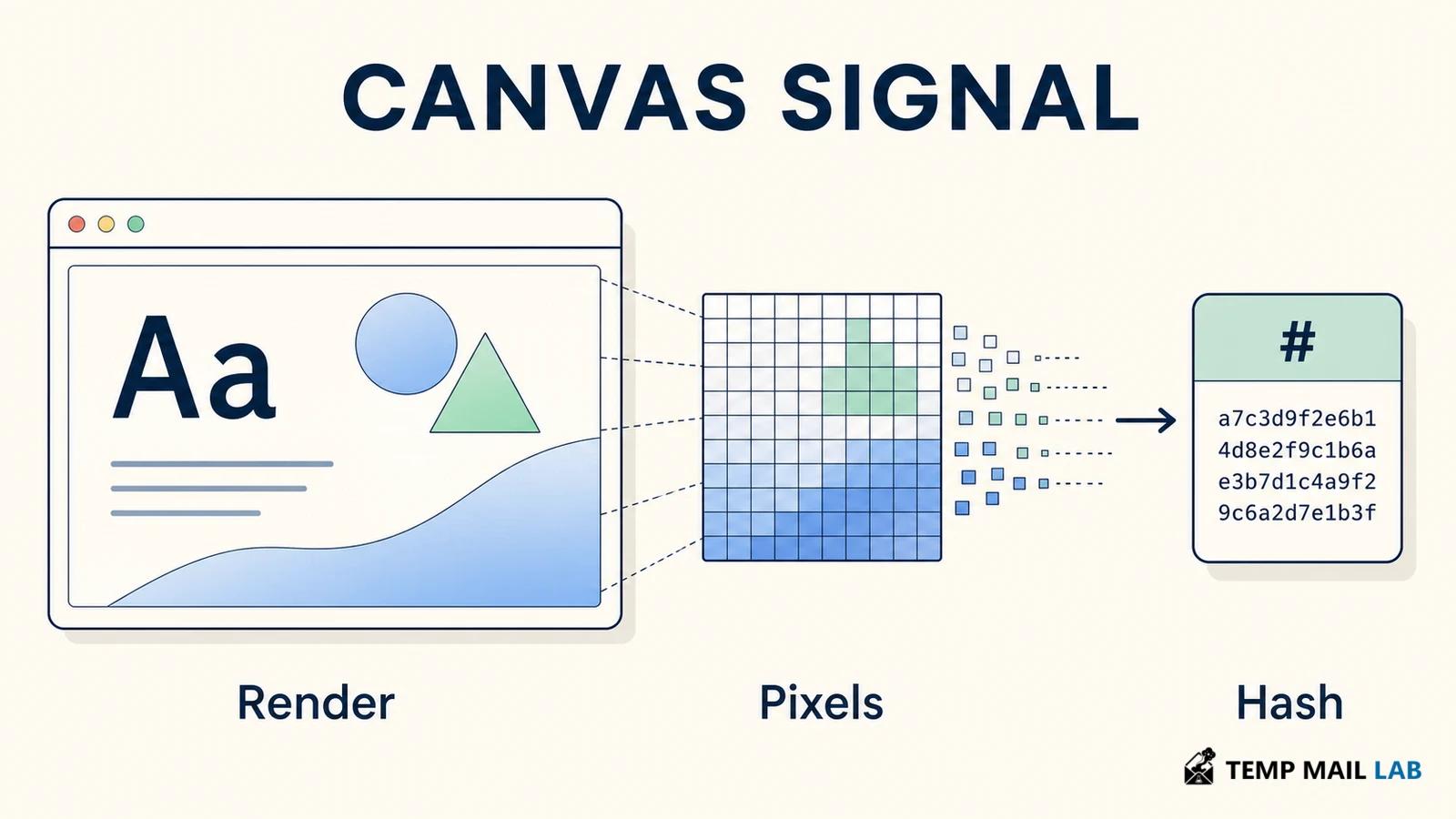
A page might ask the browser to render text, shapes, colors, gradients, or an image. The finished drawing can then be read back as pixels.
Here is where different computers may stop looking identical.
The instructions can be the same, but the final pixels may vary slightly because of the operating system, fonts, browser engine, graphics driver, hardware acceleration, and other parts of the rendering process.
A fingerprinting script can take advantage of those differences.
One approach is to ask the browser to draw a small test image that includes text, shapes, and colors. The script can then read the finished pixels. Keeping the picture itself would be unnecessary, so the result is often reduced to a compact value that is much easier to compare with an earlier visit.
If that value turns up again, it adds a little more evidence that the browser may have been seen before. How useful the match is depends on the rest of the fingerprint and on whether the rendering has stayed stable.
Canvas results can change for perfectly ordinary reasons. Moving to another computer will obviously do it, but smaller changes can matter too. A browser or graphics-driver update, a different font, or a privacy setting may alter what gets drawn.
This is also why finding Canvas code on a page is not enough to say that fingerprinting is happening.
Canvas is used everywhere on the web. A charting library may read pixels as part of rendering. An image editor needs access to the picture the user is working on. A game can make thousands of Canvas operations during normal play.
What matters is how the output is handled after that.
If the page turns a rendering result into a value that is stored, transmitted, or combined with other browser characteristics, then the same feature can become useful for recognition.
Browsers have to balance that privacy concern against legitimate uses of Canvas. Blocking readback entirely would break real applications, so protections are usually narrower. A browser may reduce the precision of what is exposed, alter some results, or try to make differences between users less useful to a fingerprinting script.
WebGL adds information from the graphics stack
WebGL lets a website use accelerated graphics through the browser.
Games use it. So do interactive maps, 3D product previews, scientific tools, and visualizations.
Because WebGL sits closer to the graphics environment, it can reveal differences between systems that otherwise look similar.
A page can see which WebGL features are supported, which extensions are available, how shaders behave, and what certain graphics operations produce.
In some situations, WebGL can also provide information related to the graphics vendor or renderer.
MDN documents an extension named WEBGL_debug_renderer_info that can expose renderer information when the browser allows it.
MDN: WEBGL_debug_renderer_info
Privacy settings can restrict access. Firefox, for example, limits this information when its anti-fingerprinting protections are enabled.
Even when a renderer string is visible, it should not be confused with a hardware serial number.
Many computers share the same GPU family. Drivers change. Virtual machines and remote desktops can produce different results. A browser update may also alter what is exposed.
The value becomes more interesting when it sits beside the rest of the fingerprint.
A graphics renderer shared by a million devices is not particularly distinctive. The same renderer together with a rare screen configuration, browser version, language, font set, and other signals can narrow things down further.

The rest of the browser adds more clues
Canvas and WebGL receive a lot of attention because they are easy examples to demonstrate, but a fingerprint can include much more.
Depending on the browser, a site may be able to observe things such as:
- browser and operating-system information
- preferred languages
- time zone
- screen and window dimensions
- device pixel ratio
- touch capabilities
- available fonts
- supported audio and video formats
- CSS and JavaScript features
- audio behavior
- WebRTC characteristics
- timing measurements
The network contributes information as well.
The website has to receive a connection in order to return a page, so an IP address is part of that interaction. Headers sent with the request may provide more context before scripts on the page do anything.
After that, the page can collect additional information inside the browser.
A service might keep these observations separate. It might also combine them with an account login, security history, analytics data, or another identifier.
Once that happens, the fingerprint becomes part of a much larger record.
Fingerprinting is not always about advertising
Tracking is the use most people associate with browser fingerprints, but the same observations can appear in security systems.
Suppose you normally sign in to an account from the same laptop.
One day the login comes from a different browser, another country, and a device with very different characteristics. A security system may treat that change as one reason to ask for another authentication step.
Fraud systems can use similar signals when looking for automated accounts or repeated abuse.
That does not make fingerprinting harmless. It simply means the purpose matters.
A short-lived security signal used during login is not the same thing as a browser profile retained for years and shared with other companies.
How the data is stored, connected, retained, and reused matters at least as much as the individual values collected.
Why deleting cookies may not reset recognition
A cookie and a fingerprint solve the recognition problem in different ways.
With a cookie, the site stores a value in the browser and reads it again later.
Fingerprinting can work without placing that value there.
The site simply looks again.
After cookies are cleared, the browser may still have the same screen, fonts, language, graphics behavior, time zone, and many of the same settings it had five minutes earlier.
Run the same observations again and the new result may resemble the old one.
Whether the site decides it is the same browser depends on how its system works and how much the browser has changed.
Changing networks creates a similar situation.
Move from home Wi-Fi to mobile data and the IP address visible to the site may be different. Connect through a VPN and the destination sees the VPN server's address instead.
But the browser on top of that connection may still render Canvas the same way, expose the same display, use the same fonts, and behave much as it did before.
A VPN therefore changes an important part of what the destination sees, but it does not automatically rebuild the browser environment.
Tor Browser tackles the browser side more deliberately.
Rather than encouraging every user to create a highly customized configuration, it tries to make many users resemble one another. If lots of browsers report similar characteristics, an individual browser is harder to distinguish from that group.
The W3C has also discussed the fact that reducing network-level linkability does not automatically remove fingerprinting at the browser layer.
A fingerprint can change, though.
A browser update can alter values. A new device obviously changes many of them. Shared computers complicate attribution. Privacy protections may reduce or modify what can be measured.
So a fingerprint can support a guess that two visits are related. It should not be treated as proof that the same human was behind both visits.
How browsers try to reduce fingerprinting
Browsers have several options.
They can stop exposing a detail altogether.
They can make a precise value less precise.
They can return a more standardized value so that many users look the same.
Some information can also be separated by site, making it harder for one company to reuse state created in another context.
Tor Browser relies heavily on standardization.
Firefox has its own fingerprinting protections, including settings that restrict or modify several browser characteristics.
Other browsers combine anti-tracking systems, storage partitioning, permission controls, and limits on certain APIs.
There is an unavoidable tension here.
A website sometimes genuinely needs detailed information.
A 3D application needs graphics support. A video player needs to know whether a codec works. A drawing tool needs Canvas.
Remove too much information and legitimate websites break.
That is why browser privacy work usually involves reducing unnecessary detail rather than pretending that a web page can function without learning anything about the environment running it.
Privacy extensions can help, but more is not always better
Blocking a known tracking script can obviously prevent that script from performing its fingerprinting tests.
Some extensions also modify browser APIs or restrict information available to pages.
But an extension becomes part of the browser environment too.
Install a rare collection of extensions, change many obscure settings, and your setup may look less like other people's browsers.
There is also the extension itself to consider. Privacy tools sometimes require broad access because of the job they perform. Their permissions and data practices still deserve scrutiny.
Private browsing is another feature that is easy to overestimate.
A private window is useful for keeping local browsing history and temporary session data separate. It does not give the browser a new graphics card, a new screen, or a different set of supported features.
While that private window is open, websites can still interact with the browser in front of them.
What is worth doing as a user?
There is no need to turn a normal browser into a collection of experimental privacy tweaks.
For most people, keeping the browser current and using its built-in tracking protections is a reasonable starting point. Extensions can still help, but adding several tools that all alter the same APIs can make the setup harder to understand rather than obviously more private.
If you are curious about what your browser exposes, EFF's Cover Your Tracks can show a sample of the information available to a webpage.
EFF Cover Your Tracks
The test tells you about the browser at that moment. It is not a permanent rating.
Run it after a browser update and some values may be different. Another site may check things that the test does not. More importantly, seeing that a value is available tells you nothing by itself about whether a particular company stores it, shares it, or uses it to recognize later visits.
Keeping work and personal activity in separate browser profiles can also be useful. The reason is fairly ordinary: it keeps different sessions, extensions, cookies, and account activity from being mixed together as easily.
Using separate profiles does not hide the browser from the sites you visit. Think of it more like keeping two desks for different kinds of work. The papers are less likely to get mixed together, but anyone standing at either desk can still see what is on it.
The same applies here. A work profile and a personal profile can keep sessions and accounts apart without making either profile invisible.
If fingerprinting is a serious concern, changing random advanced settings one by one is usually a frustrating way to approach it. One setting may reduce a signal while another change makes the browser unusual in a different way.
Browsers designed with fingerprint resistance in mind try to solve that problem as a whole. They can make coordinated choices about what to expose and how users should look to websites, instead of leaving every person with a unique collection of tweaks.
A note for website developers
A developer can often reduce fingerprinting before any privacy setting on the user's side becomes relevant.
Start with the feature itself.
If a dashboard uses Canvas to draw a graph, then Canvas access obviously has a purpose. But the graph does not need a permanent identifier made from its pixels just to appear on the screen.
A WebGL product viewer is another example. It may need to check whether the browser supports WebGL and perhaps which features are available. Once the viewer is working, storing detailed renderer information may not add anything useful for the customer.
This is where unnecessary data tends to creep in. A value is available, so it gets logged. Then it is copied into analytics. Months later it is attached to an account record even though nobody originally needed it there.
Collecting less at the beginning avoids that problem.
Fraud systems are a little different because recognizing a familiar or unusual device can be useful. Even then, the browser signal should have a defined job.
Imagine a login that suddenly arrives from an unfamiliar browser. Keeping a few signals long enough to assess that login may be reasonable. Keeping every measurement indefinitely simply because it might become useful later is a much broader decision.
The difference becomes obvious when the fingerprint is combined with other records.
A Canvas result sitting by itself tells you relatively little. Put it beside an account ID, several months of IP addresses, previous devices, login times, and analytics history, and you now have a detailed record of how that account has been used.
At that point, retention and access matter a lot more.
Matching is also imperfect in ways that show up quickly in real life.
Families share computers. Employees replace laptops. Browsers update while people sleep. A person can keep the same account for years while nearly every technical characteristic around that account changes.
The reverse can happen too. Two unrelated users may have ordinary laptops with very similar configurations.
For a security system, a fingerprint can be a useful clue. Maybe an unfamiliar browser is enough to trigger another verification step. That is very different from treating the fingerprint as proof that a particular person performed an action.
So what is a browser fingerprint, really?
The name is slightly misleading.
When people hear "fingerprint," they tend to think of something unique and permanent. The prints on your fingers are closely tied to you. A browser fingerprint is far messier.
It is closer to taking notes about a browser.
A site might note that the browser uses a certain language, has a particular screen size, renders Canvas in a certain way, exposes a specific graphics environment, and arrives from a certain network.
You visit again next week and the site takes another set of notes.
Maybe everything looks almost identical.
Maybe the browser has updated and several details are different.
Maybe you have moved to another machine but still use the same account.
The website now has to decide whether the new set of observations looks close enough to something it has seen before.
There is no universal rule for that decision.
One company may care a lot about graphics information. Another may barely use it and rely more heavily on login history, IP changes, or account behavior. A third may collect only a few signals for fraud detection and discard them soon afterward.
That is why asking whether Canvas or WebGL "can fingerprint you" only tells part of the story.
The more revealing question is what happens after the measurement.
Suppose a site reads a Canvas result once during a security check and never saves it. Compare that with a service that keeps the result for years, links it to an account, adds IP history and device information, and then uses the combined profile elsewhere.
Both have observed browser characteristics. The privacy consequences are not remotely the same.
When you are trying to understand how a website uses fingerprinting, look past the individual APIs and look at the record being built.
What was saved?
Was it attached to an account or another identifier?
How long will it stay there?
Who else receives it?
Those answers tell you much more about the privacy impact than the existence of a Canvas hash by itself.