
Educational purpose: This guide explains the topic in clear language to help readers make safer, informed, and lawful choices.
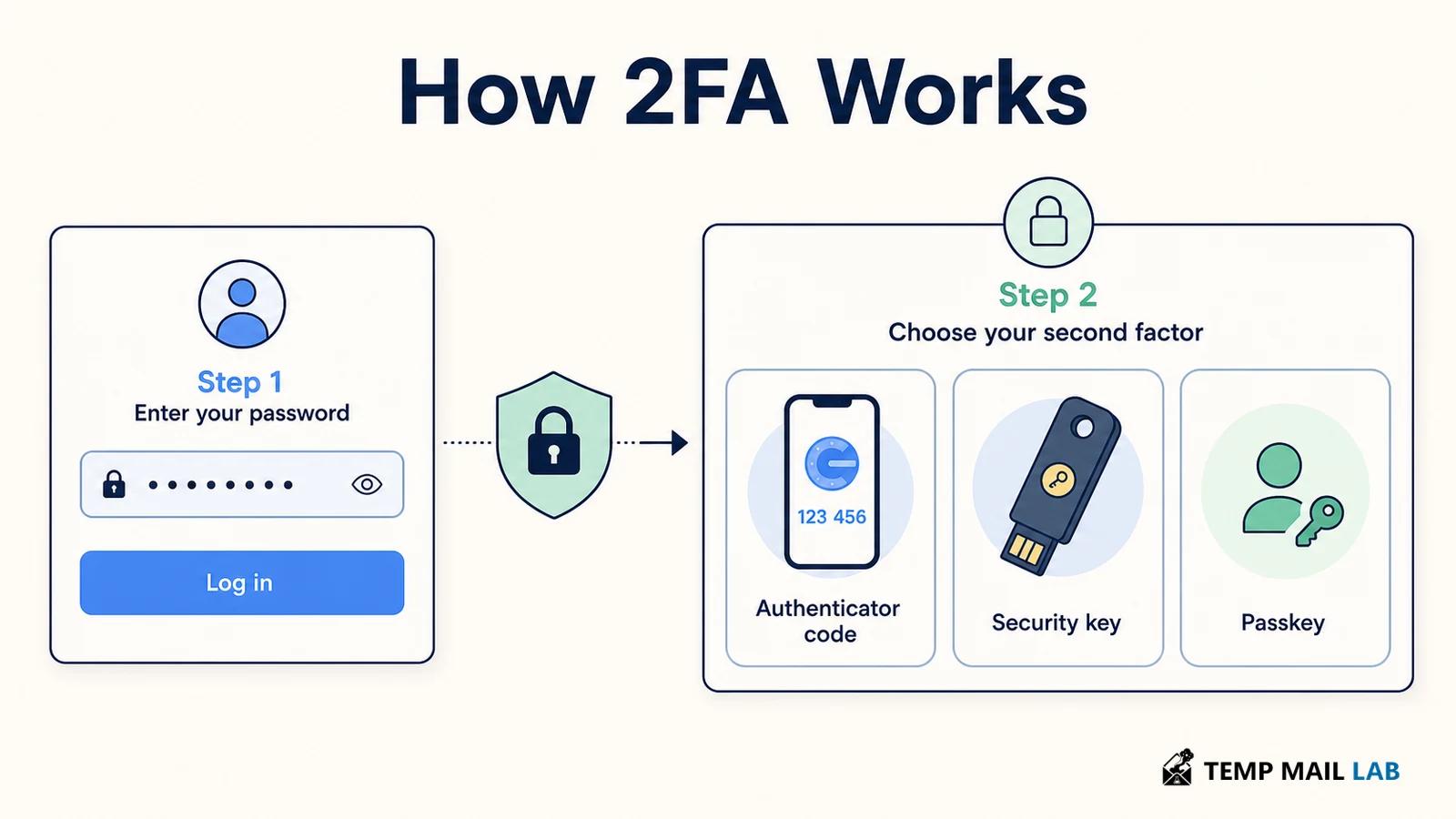
Two-factor authentication (2FA) asks for two different kinds of proof before an account opens. A password is often the first. The second may be a code from an authenticator app, a security key, or approval on a trusted device. A stolen password is therefore not always enough to sign in. The strength of the protection depends on the second method, how it is enrolled, and whether account recovery can bypass it.
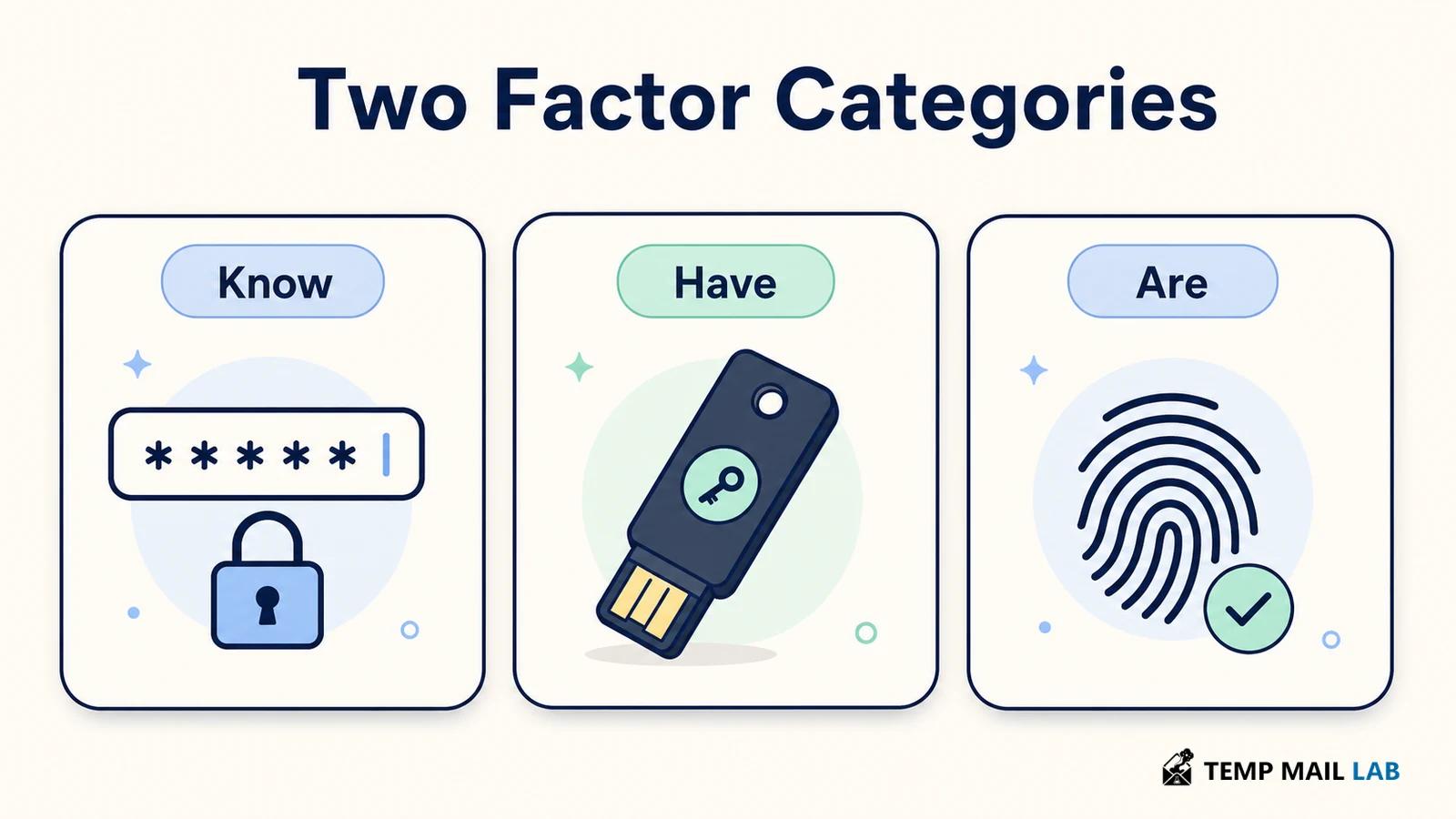
The term 2FA describes two factors. MFA is the broader term for two or more factors. A password plus a PIN is still one factor because both are something you know. A password plus a phone-based code combines something you know with something you have. NIST's current digital identity guidance separates factors into knowledge, possession, and biometric characteristics.
What counts as an authentication factor?
Something you know is a secret stored in your memory, such as a password, passphrase, or PIN. It is useful, but people reuse passwords, choose predictable ones, and sometimes enter them into fake login pages. A password manager can help with unique passwords, yet it does not make a password immune to phishing or theft.
Something you have is a device or object under your control. Examples include a hardware security key, an authenticator app that holds a cryptographic secret, or a phone that receives a code. Possession is the point. The service wants evidence that the person signing in controls the registered device, not just that they know a password.
Something you are refers to a biometric characteristic, such as a fingerprint or face scan. In many systems, the biometric unlocks a credential stored on the device. The website may receive a cryptographic result rather than a copy of your fingerprint. The exact privacy behavior depends on the platform and service, so a biometric prompt is not automatically the same thing as sending biometric data to a server.
How a 2FA login works
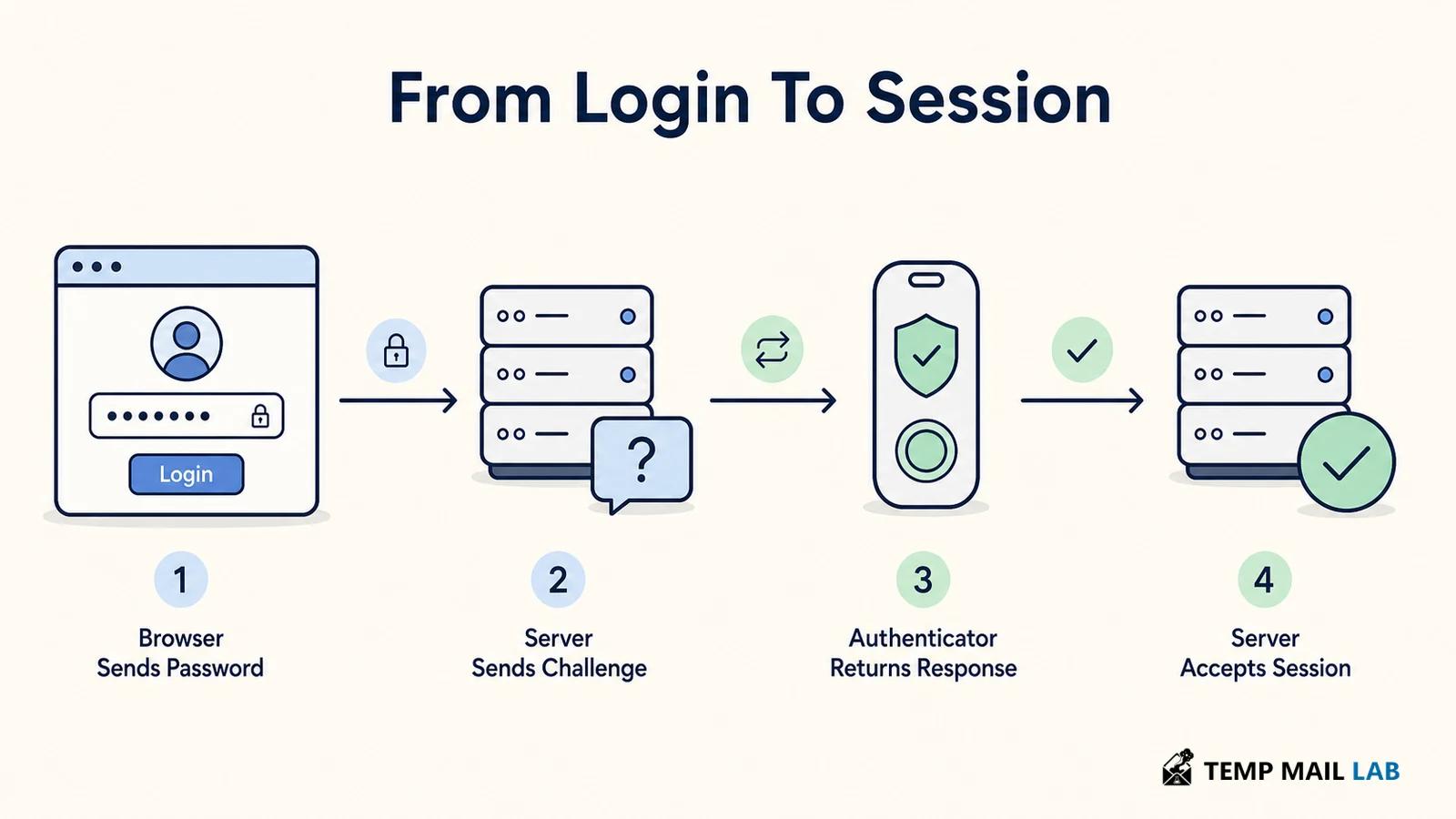
A typical login is a short exchange. You enter a username and password. Once the service accepts the password, it asks for the registered second factor.
You may enter a code, approve a prompt, tap a security key, or unlock a passkey with a local PIN or biometric. The service verifies that response, creates an authenticated session, and gives the browser a session cookie or token. The second step must therefore be checked before access is granted, not after the account is already open.
The second step is tied to the account and to a particular authentication event. A time-based one-time password, or TOTP, is generated from a shared secret and the current time. Your app and the server calculate the expected value independently. Because the code changes, a captured code has a short useful life. NIST also requires verifiers to prevent the same OTP from being accepted again while it is valid and to rate-limit failed attempts.
A push prompt works differently. The service sends a request to an authenticator app, and you approve it. Number matching improves this pattern by asking you to enter a number shown on the login screen. That extra check helps reduce accidental approvals and makes some push-bombing attacks harder, but it still depends on you recognizing whether the login request is yours.
A security key or passkey uses public-key cryptography. During registration, the authenticator creates a key pair for the website. The service stores the public key, while the private key stays with the authenticator or its protected sync system. During login, the site sends a fresh challenge. The authenticator signs it after you provide local approval. The server verifies the signature with the public key.
Compare SMS, authenticator apps, passkeys, and security keys
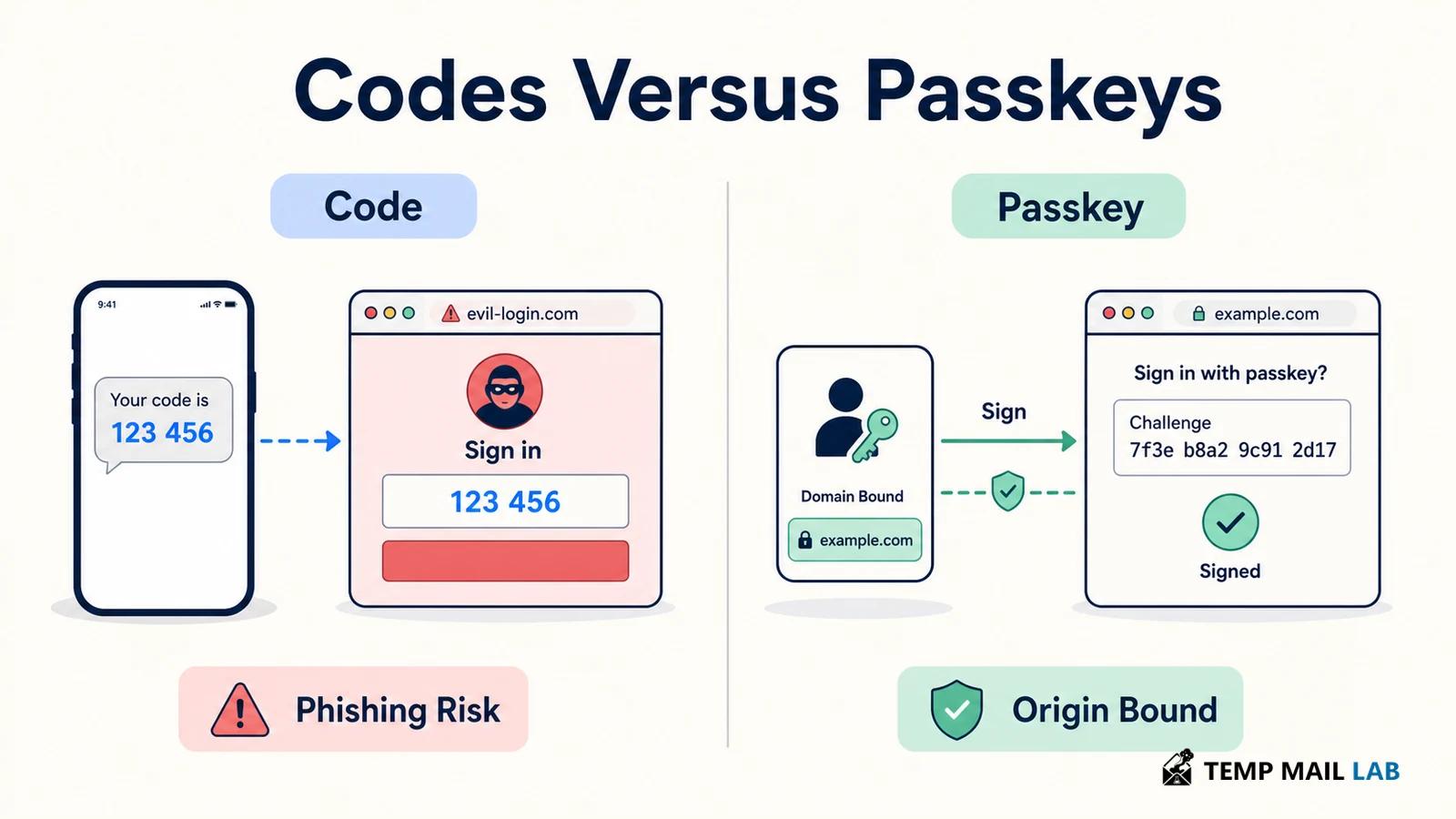
Calling every second step secure hides an important difference. SMS and email codes can help when a password has been stolen, but they may be exposed through message interception, weak account recovery, or a convincing phishing page. A phishing site can ask for the current code and relay it to the real service while the victim is still entering it. The extra step exists, yet the attacker can sometimes stand between the user and the site.
Authenticator app codes are generally stronger than SMS because they do not depend on the mobile network. They are still usually entered into a website, so a real-time phishing proxy can capture them. NIST describes OTP authentication as not phishing-resistant. CISA recommends planning for phishing-resistant MFA and identifies FIDO and WebAuthn as the widely available approach designed to block a credential from being used on the wrong domain.
WebAuthn works because the credential is scoped to the website that registered it. A fake domain cannot ask the authenticator to produce a valid response for the real domain. This does not make every login safe. Users still need to protect their devices, review unexpected prompts, and keep account recovery options secure. It does mean the second factor is checking the origin as part of the protocol.
Push approval, number matching, and cryptographic proof
A push notification can feel like proof because it appears on your phone, but the action may be only a yes or no. Repeated prompts can wear down a tired or distracted user. Number matching adds context by asking you to enter a number shown on the login screen. A cryptographic authenticator goes further: it signs a fresh challenge that the service can validate, rather than relying on a tap alone.
Biometrics also need careful wording. Your face or fingerprint usually unlocks a key on the device. It is an activation step, not necessarily a separate factor sent to the site. NIST distinguishes a multi-factor authenticator, which uses two factors in one authentication event, from two separate authenticators used together. The user experience can look similar even though the protocol and assurance differ.
Enrollment, recovery, and lost devices
Turning on 2FA links a new authenticator to the account. An authenticator app may use a QR code to transfer a seed. A security key is registered through a browser dialog. A passkey is created by the device and saved according to the platform's credential settings. This enrollment step is sensitive. Use the real service, check the domain, and never copy setup secrets into casual notes or chats.
Recovery deserves the same attention as login. Save recovery codes in a location that is separate from the account and protected from casual access. If you replace a phone, add the new authenticator before removing the old one when the service permits it.
Registering more than one security key can prevent a lost key from becoming an account lockout. Recovery email and support procedures can also become alternate paths around 2FA, so protect them with strong credentials and their own MFA.
Do not treat a backup code as a permanent password. Each code is intended for one recovery use, and anyone who obtains an unused code may be able to bypass the normal second step. If codes are exposed, rotate them. If a device or key is lost, use the service's revocation or account recovery process promptly rather than leaving an unknown authenticator active.
Where enrollment and recovery fail
Convenience can hide the tradeoff between methods. SMS may be the only option on an older service, but choose an authenticator app or security key when one is available. Treat an unexpected prompt as a warning, not a request to clear quickly. If repeated prompts make 2FA annoying, add a second key, review trusted-device settings, or choose a less interruptive method instead of disabling the protection.
Another mistake is protecting the password but ignoring the recovery channel. An attacker who controls your email can request resets, intercept notices, or persuade support to change account details. Review active sessions, backup methods, and connected applications after enabling 2FA. A login alert is useful only if you can recognize which device and location generated it.
Which 2FA method should you use?
For an important account, use a FIDO2 security key or passkey when the service supports one. These methods offer the strongest phishing resistance because the credential is bound to the site.
An authenticator app that generates TOTP codes is a practical next choice. Push approval with number matching can work when you recognize every request. SMS or email codes are still better than a password alone, but they are fallback methods rather than the strongest option.
The right choice also depends on your recovery plan. A security key is strong, but a single key can be lost. A passkey may be available on several devices through a sync system, which changes the balance between convenience and control. Whatever you choose, keep software updated, use a unique password, and test account recovery before an emergency. 2FA is a process around the account, not just one box you tick in settings.
Limits, Backup Methods, and Recovery Checks
What 2FA cannot stop
Two-factor authentication reduces the chance that a stolen password is enough to enter an account. It cannot stop every takeover. Attackers may still target recovery channels, active sessions, malicious software, or a user who approves a fraudulent prompt. Phishing-resistant methods reduce more of these risks, but no sign-in method removes the need for secure devices and recovery settings.
Are authenticator apps safer than SMS?
Authenticator apps are usually safer than SMS because their codes do not depend on the mobile network and are harder to redirect through a carrier account. They remain vulnerable to real-time phishing because the user still types the code into a page. Security keys and passkeys provide stronger phishing resistance.
What happens if you lose your phone?
Use a registered backup authenticator, a recovery code, or the service's verified recovery process. After you regain access, remove the lost device from the account and issue new recovery codes if you suspect they were exposed.
Security standards and guidance
- CISA's MFA guidance compares factor categories and common methods.
- NIST's SP 800-63B guidance describes OTP behavior, rate limiting, replay resistance, and phishing-resistant WebAuthn authenticators.