
Educational purpose: This guide explains the topic in clear language to help readers make safer, informed, and lawful choices.
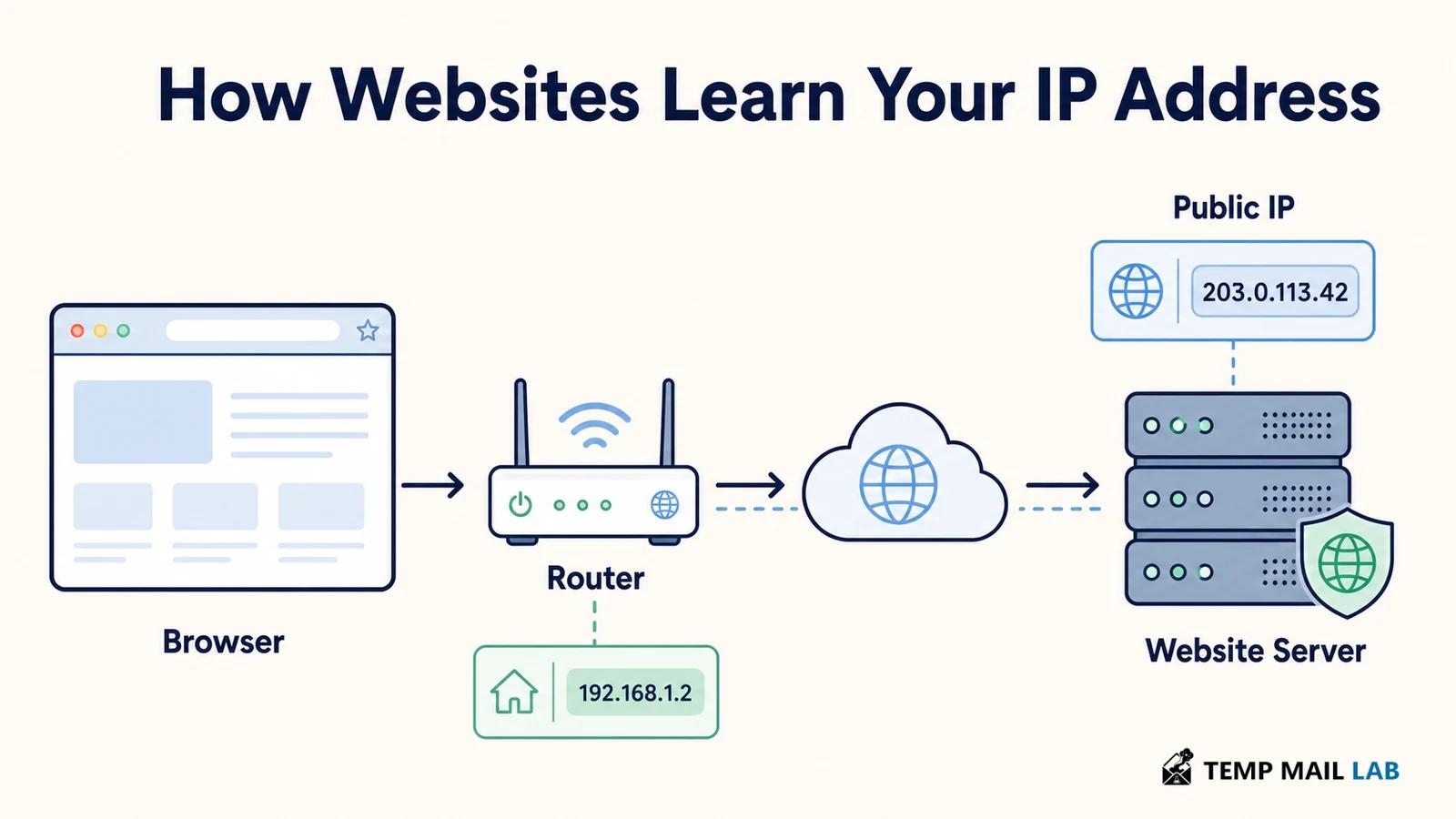
A website learns your public IP address because your browser must contact the site's server to request the page. Internet routing includes a source address so the response can return to the network that made the request. A service such as ip.me does not need a permission prompt or a hidden browser trick. It reads the address visible on the incoming connection and sends that value back in the page.
The address visible to the site may belong to your home router, mobile carrier, company gateway, proxy, or VPN exit rather than to one device. It can support routing, abuse controls, logs, and rough geolocation, but it is not a reliable street address or a unique identity.
How your IP address reaches a website
When you enter a web address, DNS helps the browser find an address for the site's hostname. The browser then opens a connection and sends an HTTP request. MDN's HTTP overview describes this as a client-server exchange in which a request reaches a server and the server returns a response. At the network layer, packets need source and destination addresses so routers know where to forward them and where replies should go.
A site may use a single server, a load balancer, a content delivery network, or several proxies. The first machine that receives your connection can record the source address it sees.
If the request is forwarded internally, another service may receive a header such as X-Forwarded-For. That header is useful inside a trusted proxy chain, but it must be handled carefully because a client can send untrusted values when the deployment does not control which proxy wrote them.
The server sees the address before the page renders
An IP display page can use a small server response, a script, or an API endpoint. The important step happens before the page is rendered: the request has already arrived at the service.
The application reads the connection metadata available to its web server, formats the address, and sends it back as text. JavaScript is not required to discover the basic public address. A script may make a second request so the page can update a label without a full reload, but the server still learns the address from that request.
Some pages show more than the address. They may add an autonomous system number, a network operator, or an approximate country and city. Those details come from an IP intelligence database, not from a magical reading of your physical location. Databases map address ranges to organizations and broad regions, and their accuracy varies by provider, mobile network, VPN exit, and how often the data is updated. Treat a city label as an estimate.
Public, private, and shared IP addresses
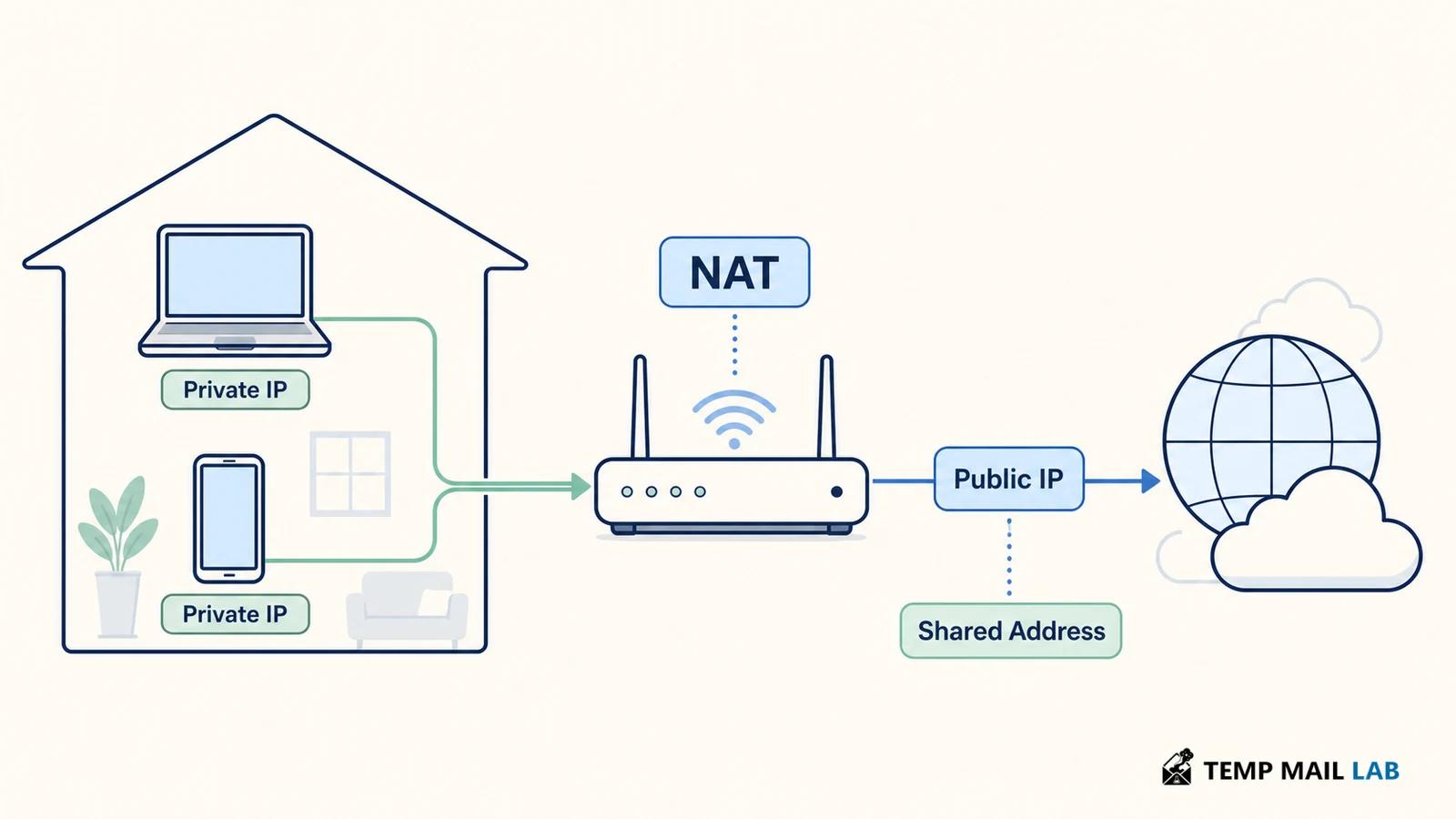
A private address is used inside a local network. RFC 1918 reserves IPv4 ranges including 10.0.0.0/8, 172.16.0.0/12, and 192.168.0.0/16 for private networks. These addresses are not routed across the public internet. A router commonly translates traffic from a private device address to a public address before the request leaves the network, so the website normally sees the translated public address rather than a value such as 192.168.1.24.
The public address may also be shared. Carrier-grade NAT can place many subscribers behind a smaller pool of public IPv4 addresses. A company, school, hotel, or coffee shop can do something similar. In those cases, an IP can be useful for rate limits and network-level investigation, but it does not uniquely identify one person or one device. Logs need time, port information, account context, and provider records to support stronger attribution.
IPv4, IPv6, and addresses that change
IPv4 uses dotted decimal notation and has a limited address space. IPv6 uses a much larger hexadecimal address space. A modern browser may prefer IPv6 when the network and site support it, or use IPv4 when they do not. The visible address can change when a router reconnects, a mobile device moves between networks, a provider rotates leases, or a user switches between direct access and a VPN.
A changing address does not make all activity anonymous, and a stable address does not prove that one person is behind every request. Websites often combine network information with account sign-in, cookies, device signals, timestamps, and application logs. A privacy review should ask what data is combined, how long it is kept, who can access it, and whether the service explains those practices.
How proxies, VPNs, and forwarding headers change the address
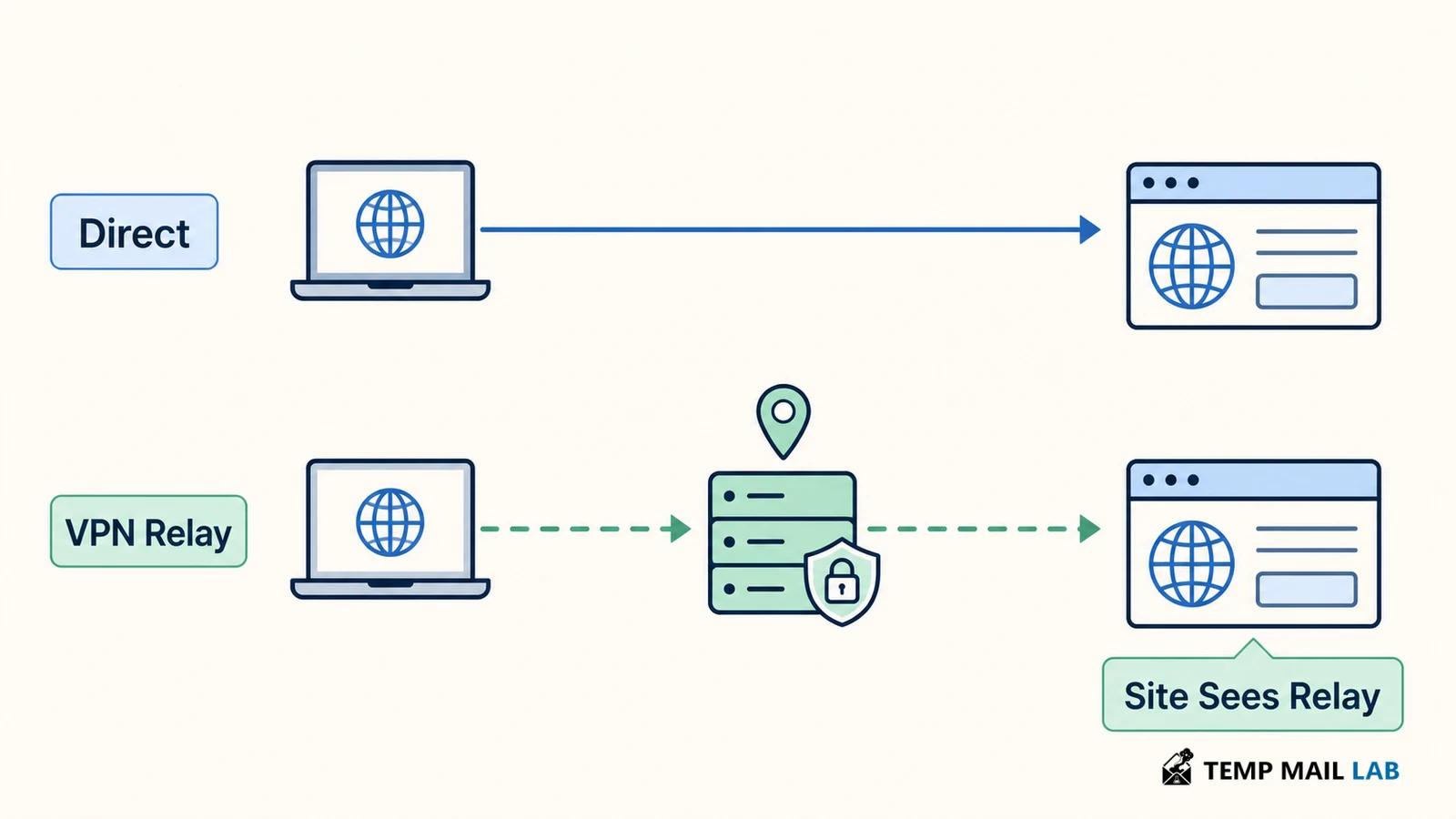
A proxy or VPN changes the network path. The destination usually sees the relay's address because the relay creates the connection to the destination. This can hide the home network address from the site, but the relay can still see traffic metadata according to its design and policy. A VPN also does not erase account identifiers, browser storage, or information that you deliberately submit to the site.
Forwarding headers create an important trust boundary. A reverse proxy that you control can pass the original client address to an application. MDN's X-Forwarded-For guidance explains that the trustworthy address depends on which proxies are known and controlled. Applications should not treat every value in that header as proof of identity because a client can supply untrusted entries when the proxy chain is misconfigured.
What an IP address can and cannot reveal
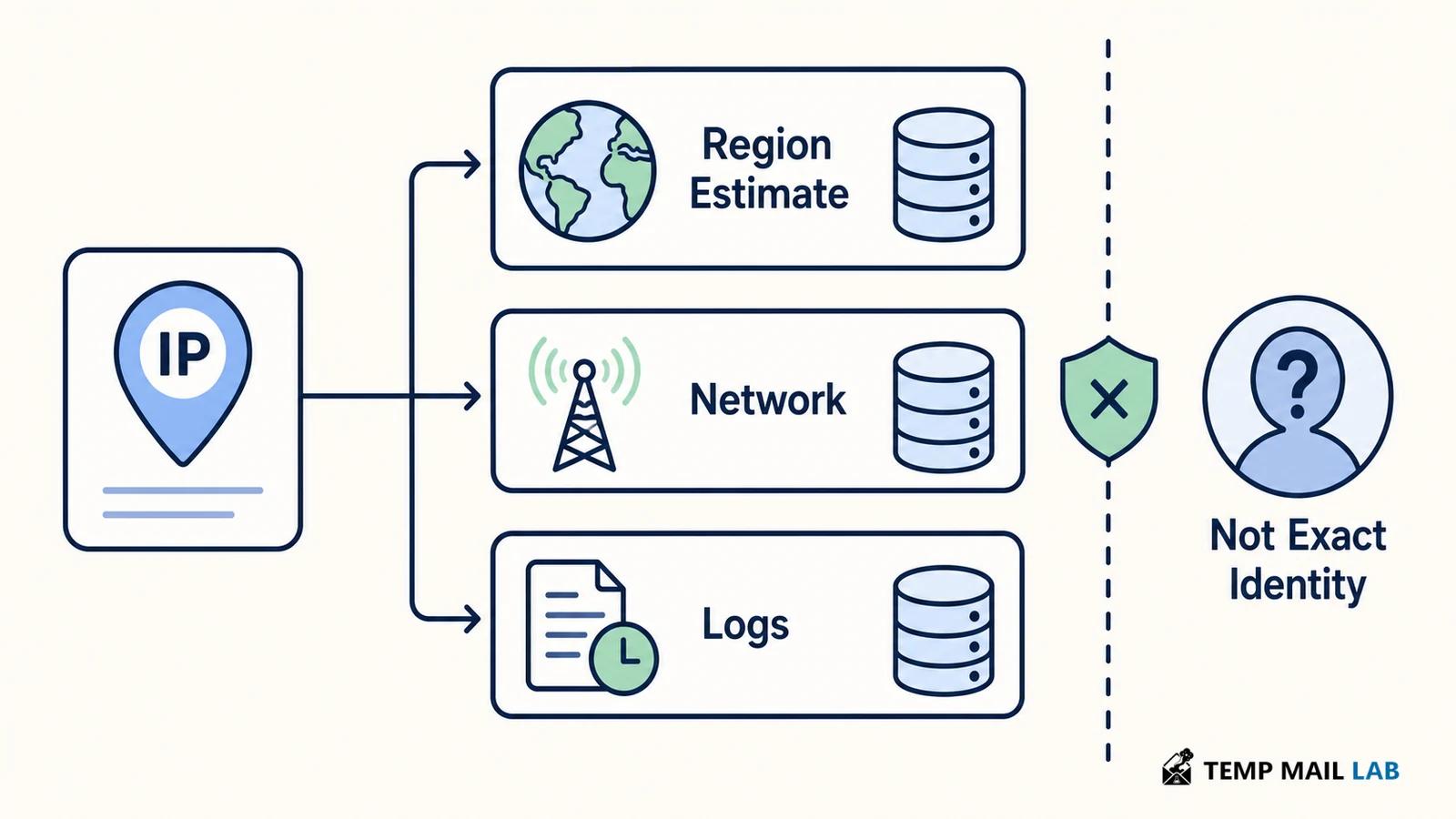
An IP address can support delivery, abuse controls, approximate geolocation, and troubleshooting. It can help a service recognize that many requests come through one network or that a request appears to originate from a hosting provider or known VPN range. It may also be included in operational logs that help investigate outages or attacks.
An IP address usually cannot tell a website your exact home address, legal name, or every other site you visit. Those conclusions require other data sources or legal and provider processes. Geolocation databases can be wrong, especially for mobile networks, corporate gateways, satellite links, and privacy relays. Good explanations separate what the address directly shows from what an organization infers by combining it with other records.
Collection and retention are separate decisions
A server needs a routable path for responses, so some record of the network endpoint exists during the connection. Services may retain that information for security monitoring, fraud prevention, load balancing, debugging, analytics, or legal obligations. The reason does not automatically justify indefinite retention. A responsible service should describe the purpose, retention period, sharing practices, and choices available to users.
The same data can have different risk depending on context. A public forum may expose an address to moderators but not ordinary readers. A login service may tie it to an account. A diagnostic page may display it only to you while still keeping access logs. Read the site's privacy notice and consider whether the feature you need requires a third-party lookup or simply a direct response from the service.
How to reduce unnecessary IP exposure
You can reduce unnecessary exposure without pretending that an IP address can be eliminated from every connection. Check whether a VPN provider explains its logging policy and jurisdiction. Review proxy and browser settings, and remember that a VPN exit address can be blocked or shared. Avoid treating an IP result as a complete privacy audit. Cookies, login sessions, browser fingerprinting, DNS behavior, and the data you type can still connect activity.
If you operate a website, document which layer records the address, restrict access to logs, protect forwarding-header configuration, and set a retention period that matches the purpose. Do not publish raw addresses in public analytics dashboards. Give users a clear explanation of why the service needs network metadata. These steps improve both privacy and the reliability of your security controls.
Why an IP address is not a unique identity
Can a website see your private Wi-Fi address?
Not from the normal internet connection. A router usually translates a device's private address before traffic leaves the local network, so the website sees the public-facing address instead. A site can learn local-network details only through other browser features, software, or information you provide.
Does one IP address identify one person?
No. A public IP can represent a shared home, office, mobile carrier, VPN, hotel, or public network. Stronger identification requires additional records and context, and even then the conclusion should be stated carefully.
Why does ip.me show an address immediately?
The service can read the address attached to your request, which is why it can display a result as soon as the page loads. If you use a proxy or VPN, the displayed address is generally the relay's address instead of your home network's public address.
The displayed number is only the network endpoint visible to that service at that moment. It does not show whether the address is shared through carrier-grade NAT, whether a location database is accurate, or whether the site links the request to an account, cookies, or a browser fingerprint. Those additional records determine how much the IP contributes to identification.