
Educational purpose: This guide explains the topic in clear language to help readers make safer, informed, and lawful choices.
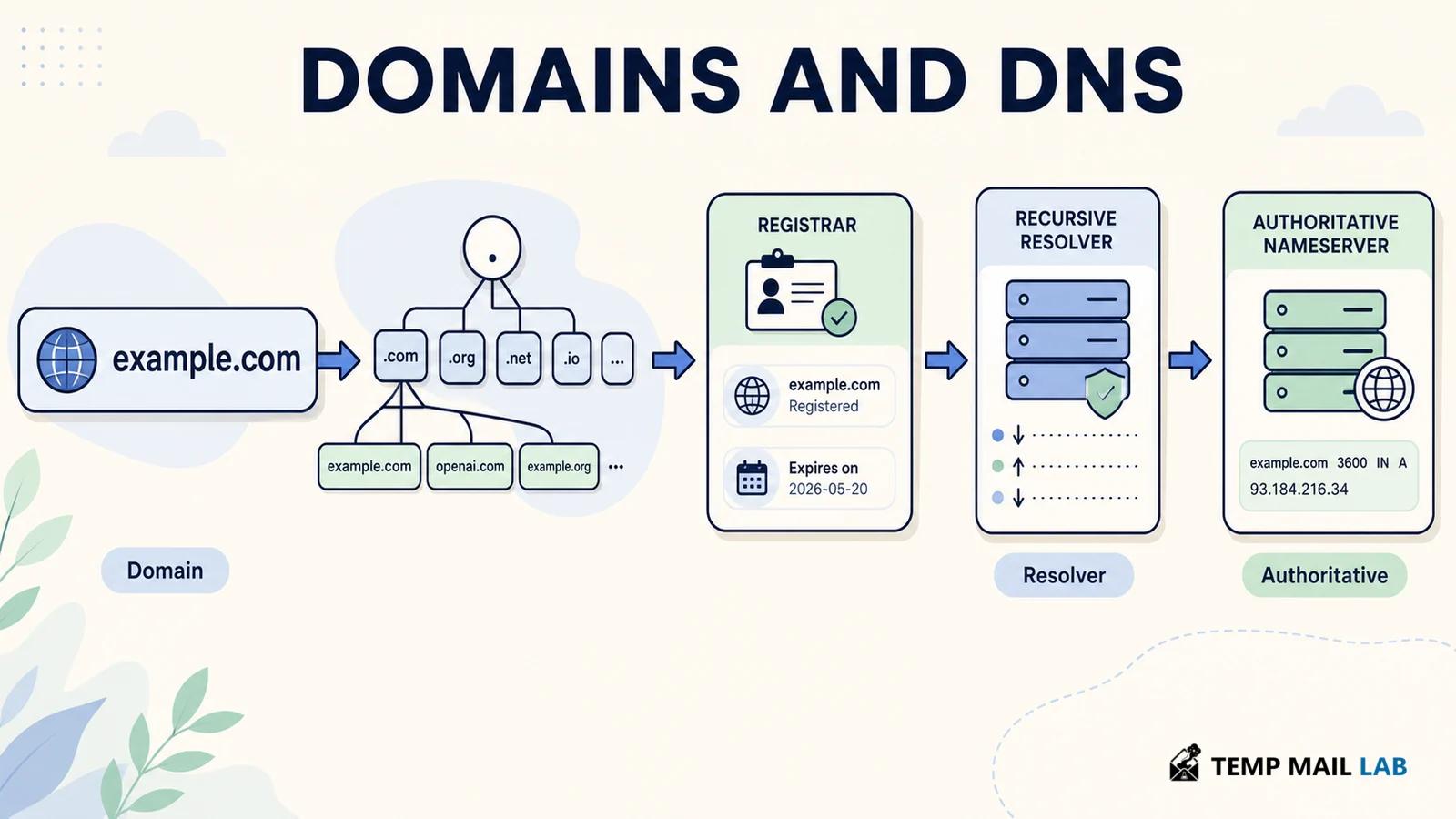
Buying a domain does not create a website, and changing a DNS record does not change the registration. A domain is a name controlled through a registrar. DNS publishes the records that tell resolvers where web, mail, and other services can be found. Keeping those functions separate makes failures easier to diagnose: the registration may be valid while the delegation, record, certificate, or application is still wrong.
What a domain name is
A domain is not a physical server, and it is not a synonym for a website. It is a name in a distributed hierarchy. In www.example.com, com is the top-level domain, example is the second-level label, and www identifies a host or service. RFC 1034 describes domain names as labels along a path to the DNS root. A final dot can represent that root explicitly, so example.com. and example.com refer to the same fully qualified name.
The hierarchy also separates responsibility. A registry operates a top-level domain such as .com or a country-code top-level domain. A registrar is the company through which a customer registers a name. The registrant is the person or organization holding the registration agreement. Those roles differ from the DNS provider, which operates the name servers that publish records. One company can offer several services, but the roles still describe separate functions.
IANA coordinates the DNS root zone and maintains the authoritative database of top-level domains. The root zone does not contain the address of every website. It contains delegations that point resolvers toward the name servers responsible for each top-level domain. A registry then knows which name servers are authoritative for a registered second-level domain. Each step directs a query closer to the answer.
How a DNS lookup works
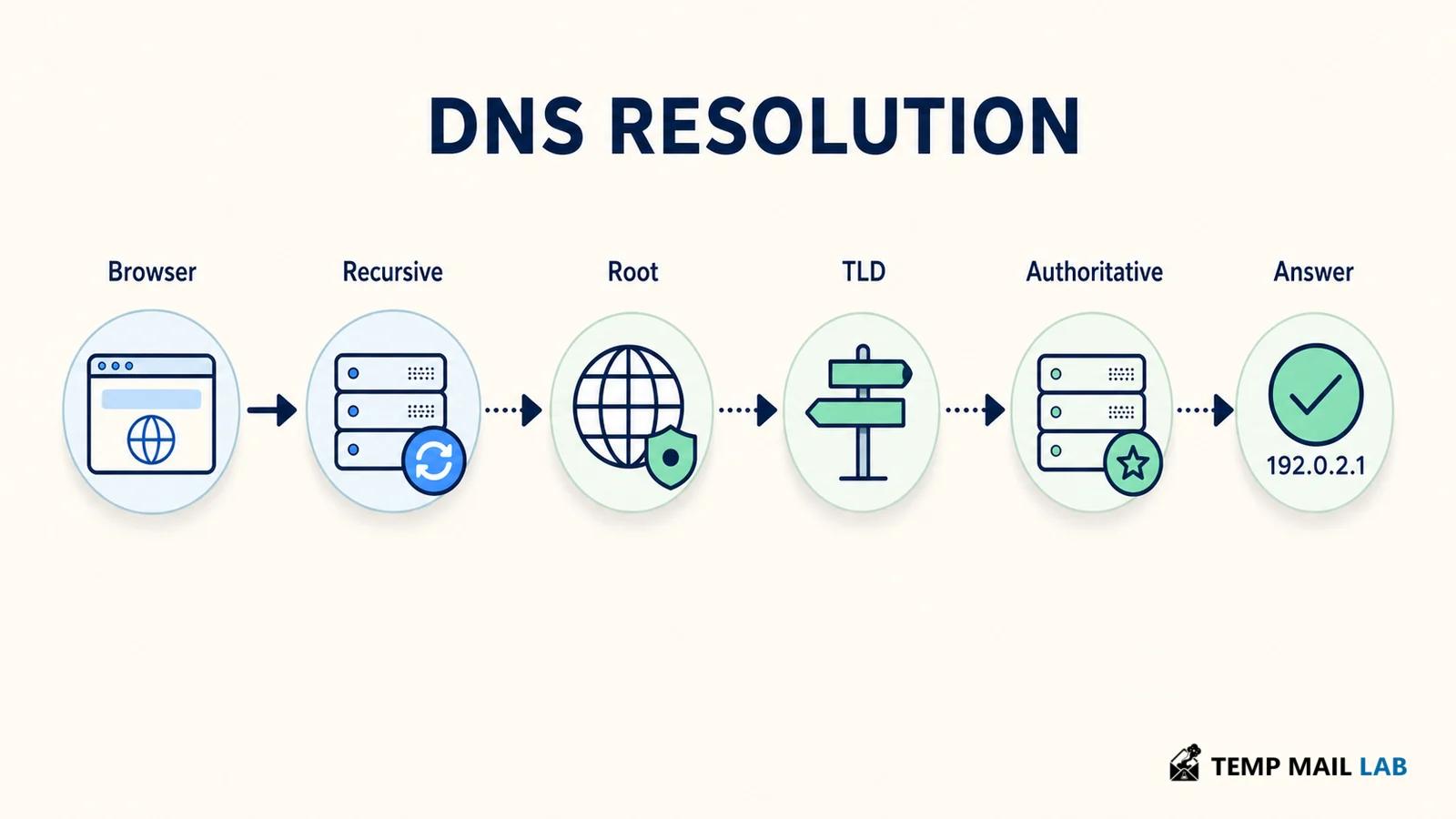
When a browser needs https://www.example.com, it normally asks a local stub resolver to find an address. The resolver may have a cached answer. If it does not, a recursive resolver sends queries through the DNS hierarchy. A root server refers it to the .com name servers. A .com server refers it to the authoritative name servers for example.com. Those servers return the record for www.example.com, and the recursive resolver sends the result back to the device.
A recursive resolver is usually operated by an internet provider, a public DNS service, an organization, or a local network. The authoritative server is different: it publishes the zone data for a domain. A cached answer can be useful, but it is not authoritative.
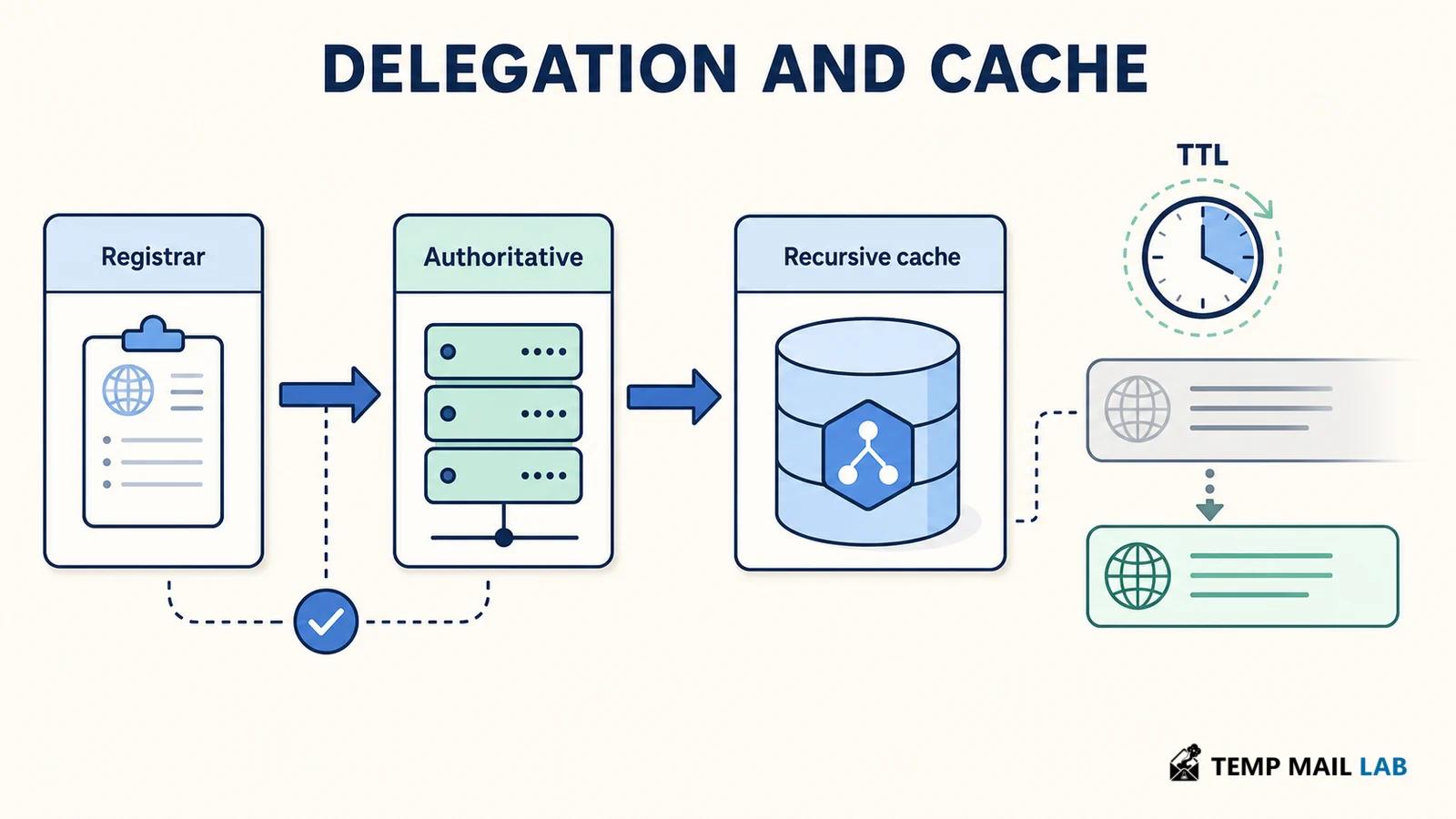
DNS responses include a time to live, or TTL, which tells caches how long they may reuse an answer before asking again. A low TTL can make changes visible sooner, while a higher TTL reduces repeated queries. Neither value guarantees an exact worldwide update time because caches refresh at different moments.
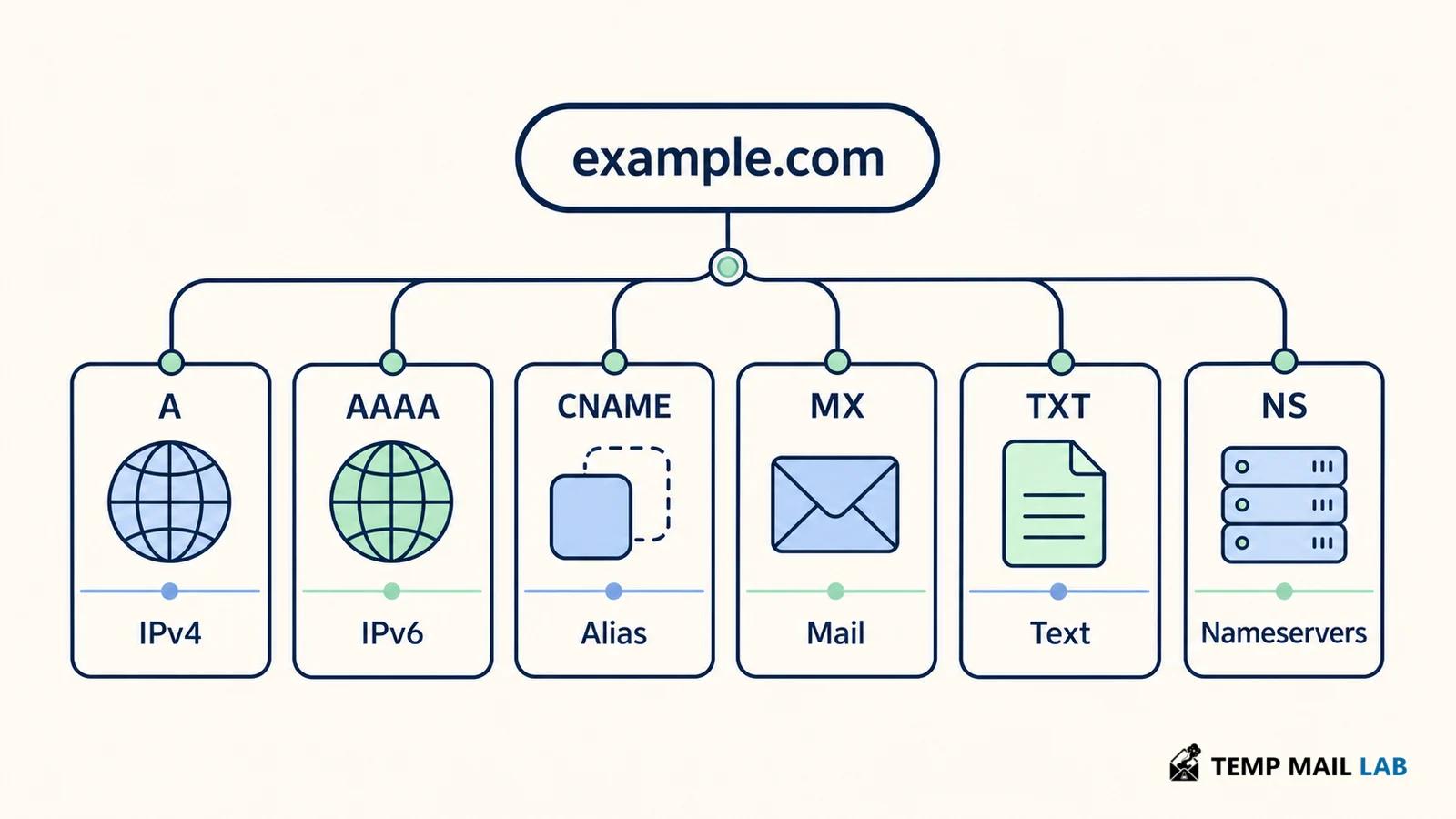
A DNS answer can contain several records. An A record maps a name to an IPv4 address. An AAAA record maps it to IPv6. A CNAME gives an alias to another DNS name rather than an address. A browser may follow that alias and then ask for the target's address. CNAMEs have placement rules and are not a universal substitute for A or AAAA records. The record type describes the relationship, while the name server and zone determine who is authoritative.
Common DNS records and what they do
Web hosting commonly uses A or AAAA records, but a modern site may also use CNAME records for a platform or content delivery service. The hostname in a certificate and the hostname in a URL still need to match the service's configuration. DNS helps the client locate a destination. It does not create a secure connection, prove that the destination is honest, or make an application available.
Email uses a different path. An MX record identifies the mail servers responsible for receiving messages for a domain. The MX record contains a host name, and that host name must resolve through A or AAAA records. The preference value helps a sending system choose among multiple mail exchangers. An MX record does not store a mailbox and does not tell a server whether a particular address exists. Our guide to how email works follows the delivery sequence in more detail.
TXT records hold text used by many services. Domain owners may publish a site-verification token, an SPF policy, or information for another service. A TXT record is just a DNS record type, not proof that the text is safe or that a message passed every security check. SPF, DKIM, and DMARC use DNS in different ways for email authentication, and each has limits. A domain can publish a policy incorrectly, or a message can pass one check while failing another.
NS records identify the authoritative name servers for a zone. SOA records describe administrative information such as the primary server, a serial value, and timing fields used for zone maintenance. PTR records support reverse DNS under namespaces such as in-addr.arpa and ip6.arpa. Reverse DNS can provide a name for an IP address, but it is not a directory of every domain hosted at that address.
Registration, delegation, and DNS hosting
Registering a domain does not automatically point it at a website. After registration, the domain needs a delegation to name servers. Those servers publish the zone, and the zone contains records for the domain and its subdomains. If you change nameservers at the registrar, the parent zone must be updated. If you change a record at the DNS provider, the delegation usually stays the same. Confusing these changes is a common reason a correct edit has no effect.
Subdomains do not usually require separate registrations. A domain owner can create labels such as blog.example.com or api.example.com inside the zone. A subdomain can point to a different service, use different records, or be delegated to another set of name servers. That flexibility is useful, but old subdomains can continue pointing to abandoned services, so review records when a provider account or project is retired.
DNS caching, TTLs, and propagation delays
People often say that DNS changes are propagating across the internet. More precisely, recursive resolvers and other caches are expiring old answers and fetching new ones. The authoritative zone may already contain the new value while a cache still has the previous value within its TTL. A browser, operating system, home router, or application can add caching too. This is why two networks can report different answers for a while.
Caching does not make a bad record harmless. If a name points to the wrong address, some users may reach the old service and others may reach the new one. Plan changes by lowering the TTL in advance when appropriate, verify the authoritative answer, and test from more than one recursive resolver. Avoid repeatedly changing records without checking which layer still has the old response.
DNS privacy and DNS security solve different problems
DNS was designed to distribute names and records, not to encrypt every query or authenticate every answer against a cryptographic chain. DNSSEC adds signatures that let validating resolvers check whether signed DNS data is authentic and whether it was altered. It does not encrypt the name a user looks up, hide the destination website, or secure the web connection. DNSSEC is a validation layer, not a replacement for HTTPS.
Encrypted DNS transports such as DNS over HTTPS and DNS over TLS protect the connection between a client and its chosen resolver from some network observers. They do not prevent the resolver from seeing the query, and they do not make DNS anonymous. The privacy result still depends on the resolver, its retention practices, device settings, and the rest of the network path.
A DNS provider can offer filtering, logging, malware blocking, or parental controls. Those features change what the resolver does with queries and sometimes how it answers. Read the provider's documentation and privacy terms instead of treating a familiar brand as a guarantee. For a domain owner, the parallel question is what data a DNS dashboard stores, who can change records, and whether account logs are protected.
How to troubleshoot DNS step by step
When a domain problem appears, check the layers in this order:
- Confirm that the domain is registered, active, and not expired.
- Check the nameservers shown at the registrar and confirm that the delegation is correct.
- Ask an authoritative server for the required record, then compare the result with a recursive resolver's cached answer.
- Confirm that the record type matches the service: A or AAAA for addresses, CNAME for an alias, MX for mail routing, and TXT for published text.
- Test the service itself. A correct DNS answer cannot repair a stopped web server, a bad certificate, or an application that rejects the request.
Match the symptom to the failing layer
The domain exists, but no website appears
Registration gives you control of a name. Hosting provides a server or platform that answers requests. DNS connects the name to that service. A valid registration can therefore exist while the web host is missing, the record points to the wrong destination, or the application is unavailable.
A record change works on one network but not another
Caches can hold the previous answer until its TTL expires. Local devices and applications may cache too. Check the authoritative answer and compare recursive resolvers before assuming the record was saved incorrectly.
DNS records do not prove who owns a site
DNS records can show technical destinations and published text, but they are not a reliable ownership directory. Registration information is handled through registrar and registry systems, and privacy or legal rules can limit what is displayed.
DNS security does not replace website security
DNS can support validation and service routing, but it is not a complete security control. Use HTTPS, secure registrar access, careful account permissions, monitoring, and application security alongside DNS protections.