
Educational purpose: This guide explains the topic in clear language to help readers make safer, informed, and lawful choices.
You write a message, press Send, and it appears in another person's inbox a few seconds later. The screen makes the process look simple. Behind it, several systems have to agree on where the message should go, whether the sending server is allowed to use its domain, whether the message looks harmful, and how the recipient will read it.
Quick answer
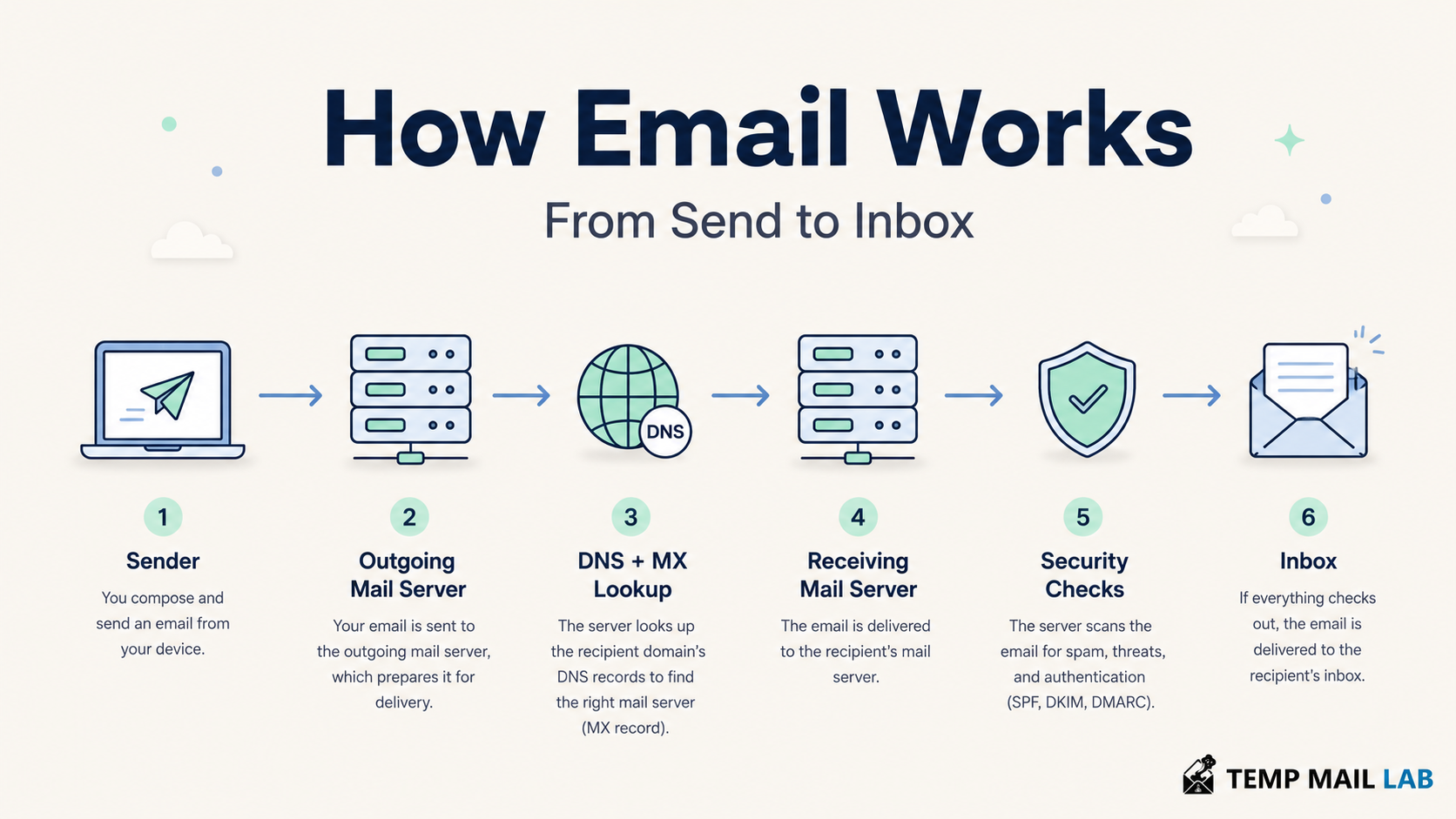
Email usually moves through this path:
Your email app submits the message to your email provider. The provider looks up the recipient domain's mail servers in DNS, then transfers the message using SMTP. The receiving server checks the sender, scans the message, and stores it in the recipient's mailbox. The recipient reads and manages that mailbox through webmail, IMAP, or, less commonly today, POP3.
That summary leaves out the parts that explain why messages sometimes arrive late, land in spam, fail authentication, or never reach the inbox.
What is inside an email?
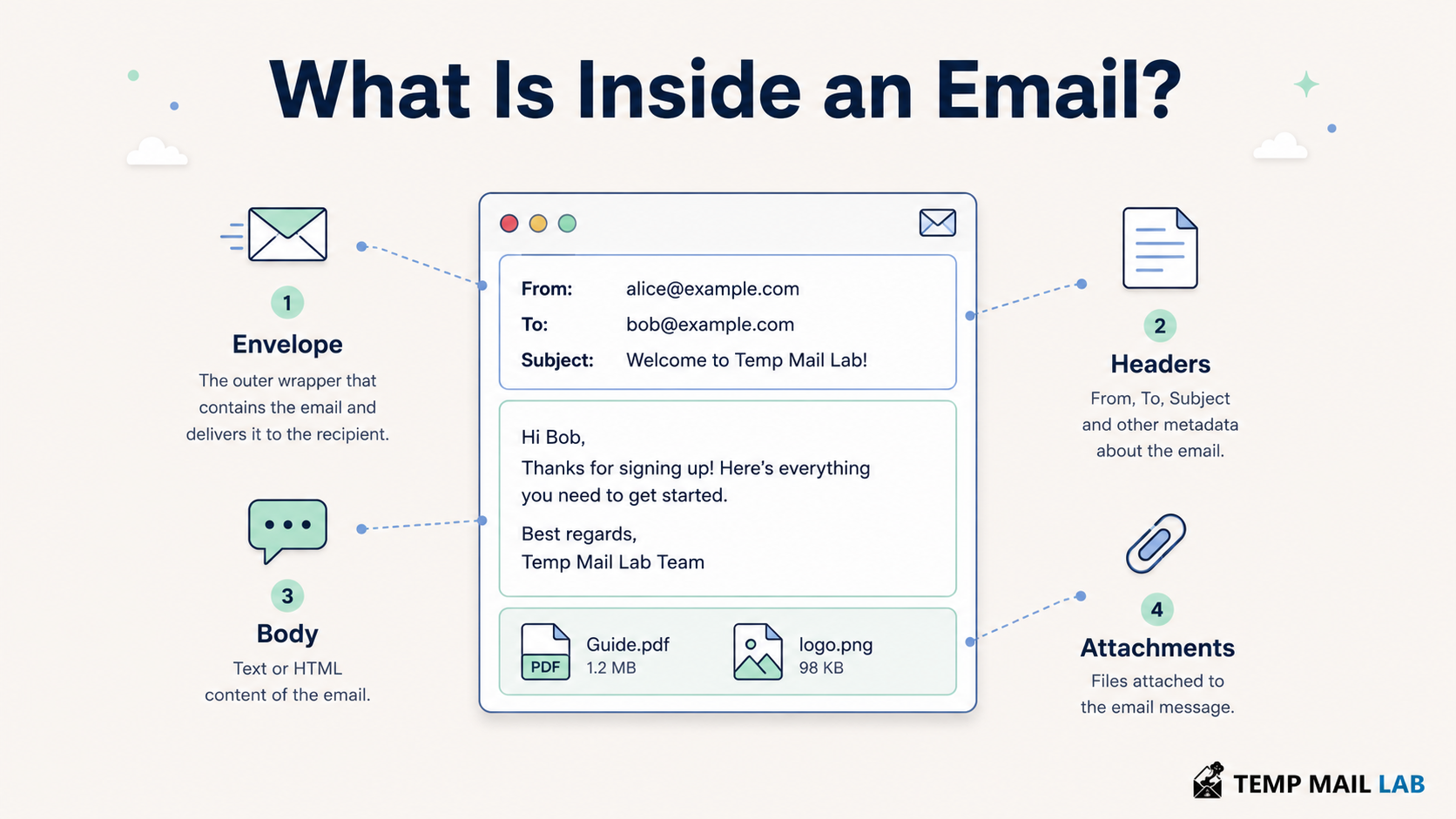
An email is not one unstructured block of text. It has an envelope, headers, a body, and sometimes attachments.
The SMTP envelope contains the addresses used while servers route the message. It includes a return path for delivery errors and one or more recipient addresses. These envelope addresses are handled during the SMTP conversation and may differ from the addresses shown on screen.
The message headers contain fields such as From, To, Date, Subject, Message-ID, and routing information added by mail servers. Your email app shows only a small part of them. The full headers can reveal which servers handled a message and the results of authentication checks.
The body contains the text or HTML that the recipient reads. MIME, short for Multipurpose Internet Mail Extensions, gives email a standard way to carry HTML, different character sets, images, and file attachments.
SPF checks an SMTP identity, while DMARC compares authenticated domains with the domain in the visible From field. A message can pass one check and fail another.
1. You compose the message
The process starts in a mail user agent. That may be a browser open to Gmail or Outlook, a desktop client such as Apple Mail or Thunderbird, or a phone app.
You enter the recipient's address, subject, body, and any attachments. The client or provider also creates information that you may never see, such as a Message-ID and MIME boundaries for a message with several parts.
At this stage, the message has not reached the recipient. It may not even have left your device yet. A desktop client can keep it in an Outbox until it has a working connection.
2. Your app submits the message
A traditional email client submits outgoing mail to a message submission server. This service commonly uses SMTP submission. It is separate from server-to-server relay so that the provider can require authentication and apply rules to its own users.
Webmail feels different because the browser sends your actions to the provider over HTTPS. Inside the provider's system, the message still enters the mail delivery process and is eventually handed to mail transfer software.
The submission server can check whether you are signed in, whether the sender address is allowed for your account, whether the message exceeds size limits, and whether the account is sending at an unusual rate. If the server accepts the message, it places it in a queue.
The queue lets email survive temporary failures. If the recipient's server is unavailable, the sending system can wait and try again instead of discarding the message immediately.
3. The sending server finds the recipient's mail server
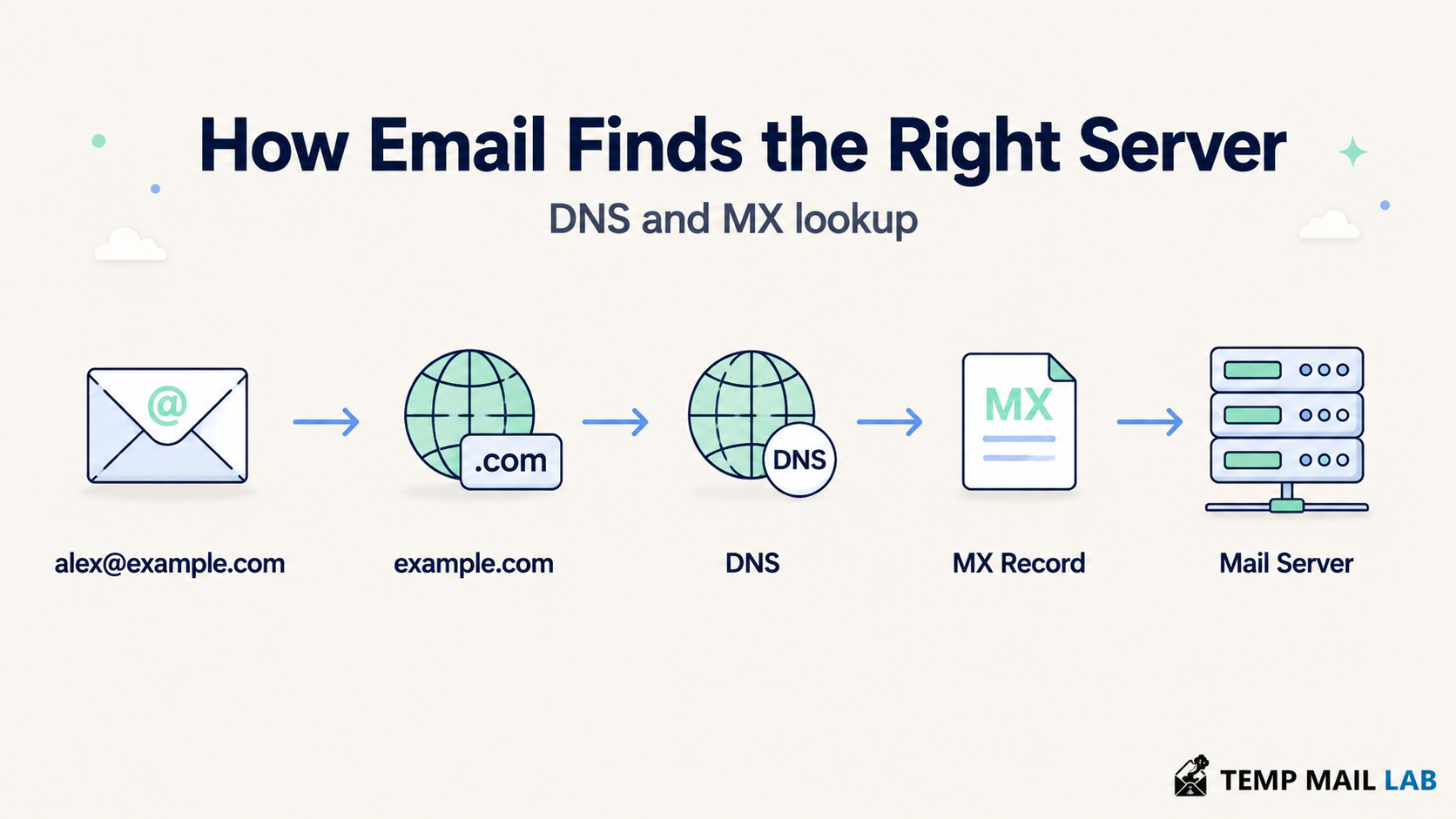
Consider the address alex@example.com. The part after the @ symbol is the domain. The sending server needs to learn which servers accept mail for that domain.
It asks the Domain Name System for the domain's MX records. MX means mail exchanger. An MX record points to a mail server hostname, not directly to a person's inbox. The sending system then resolves that hostname to an IP address and opens a connection.
A domain can publish more than one MX record. The preference values tell senders which server to try first. Backup servers may accept mail when the preferred server is unavailable.
This is more precise than saying that DNS simply converts the recipient's domain into an IP address. Normal web browsing often uses A or AAAA records for the website itself. Email delivery first looks for the domain's mail exchange records.
4. SMTP transfers the message
SMTP stands for Simple Mail Transfer Protocol. It is the standard protocol used to submit and relay Internet email.
During an SMTP conversation, the sending server introduces itself, provides the envelope sender, lists the recipients, and sends the message data. The receiving server replies after each stage. A reply can accept the command, report a temporary problem, or reject it.
A single email may pass through more than one relay before it reaches the system that owns the recipient's mailbox. Each server that handles the message can add a Received header. Reading those headers from the bottom upward often shows the route the message took.
SMTP is a transfer protocol. It does not tell your phone how to display folders, mark a message as read, or synchronize deletions. IMAP and provider-specific interfaces handle those jobs later.
5. The receiving server checks the message
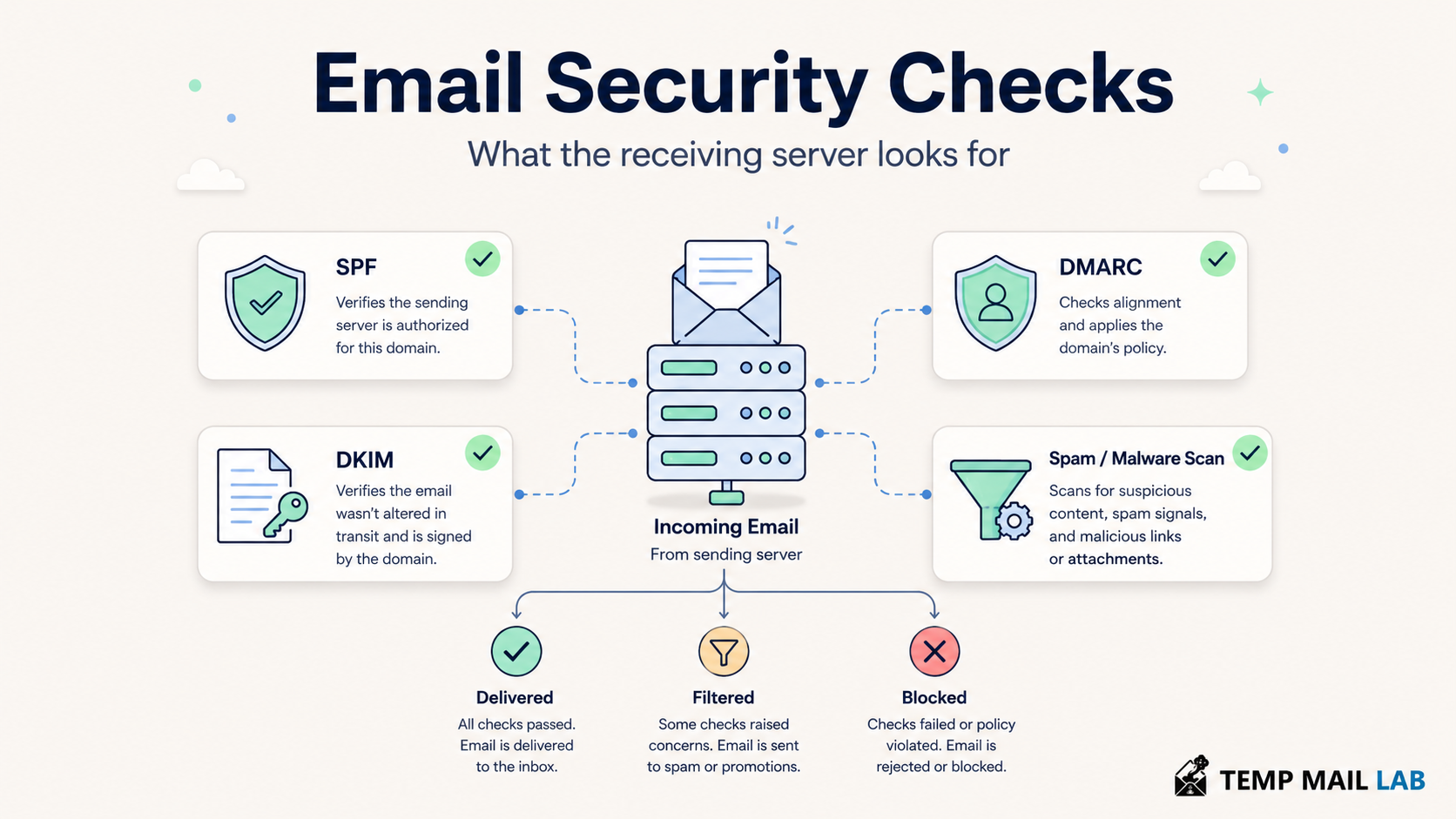
Reaching the recipient's server does not guarantee placement in the inbox. The server may run several checks before accepting the message or deciding where to store it.
SPF lets a domain publish which servers are authorized to send mail using certain SMTP identities. The receiving system compares the connecting server with that published policy.
DKIM adds a cryptographic signature to selected parts of the message. The receiver obtains the public key from DNS and verifies whether the signed content still matches.
DMARC uses SPF and DKIM results, then checks whether an authenticated domain aligns with the domain in the visible From address. The domain owner can also publish a policy for messages that fail and request reports about mail using its domain.
These checks make domain spoofing harder, but they do not prove that every authenticated message is safe. A criminal can register a lookalike domain, authenticate it correctly, and still send a convincing phishing message. DMARC also does not solve display-name impersonation by itself.
The receiving system may also inspect the sending IP's reputation, message patterns, links, attachments, previous user complaints, and malware signals. Each provider uses its own filtering systems, so the same message can reach one inbox and go to spam in another.
6. The server stores the message in a mailbox
After the server accepts the message, a delivery component places it in the recipient's mailbox. That may be the inbox, spam folder, quarantine area, or another folder chosen by a rule.
Delivery does not mean that a person read the message. A delivery status notification can report that a server delivered the message to the recipient address, but it cannot confirm that the recipient opened it or understood it.
The server may also apply user rules at this point. A filter can move receipts into a shopping folder, forward a copy to another address, or reject a message for an account that no longer exists.
7. The recipient reads the message
The recipient can access the mailbox in several ways.
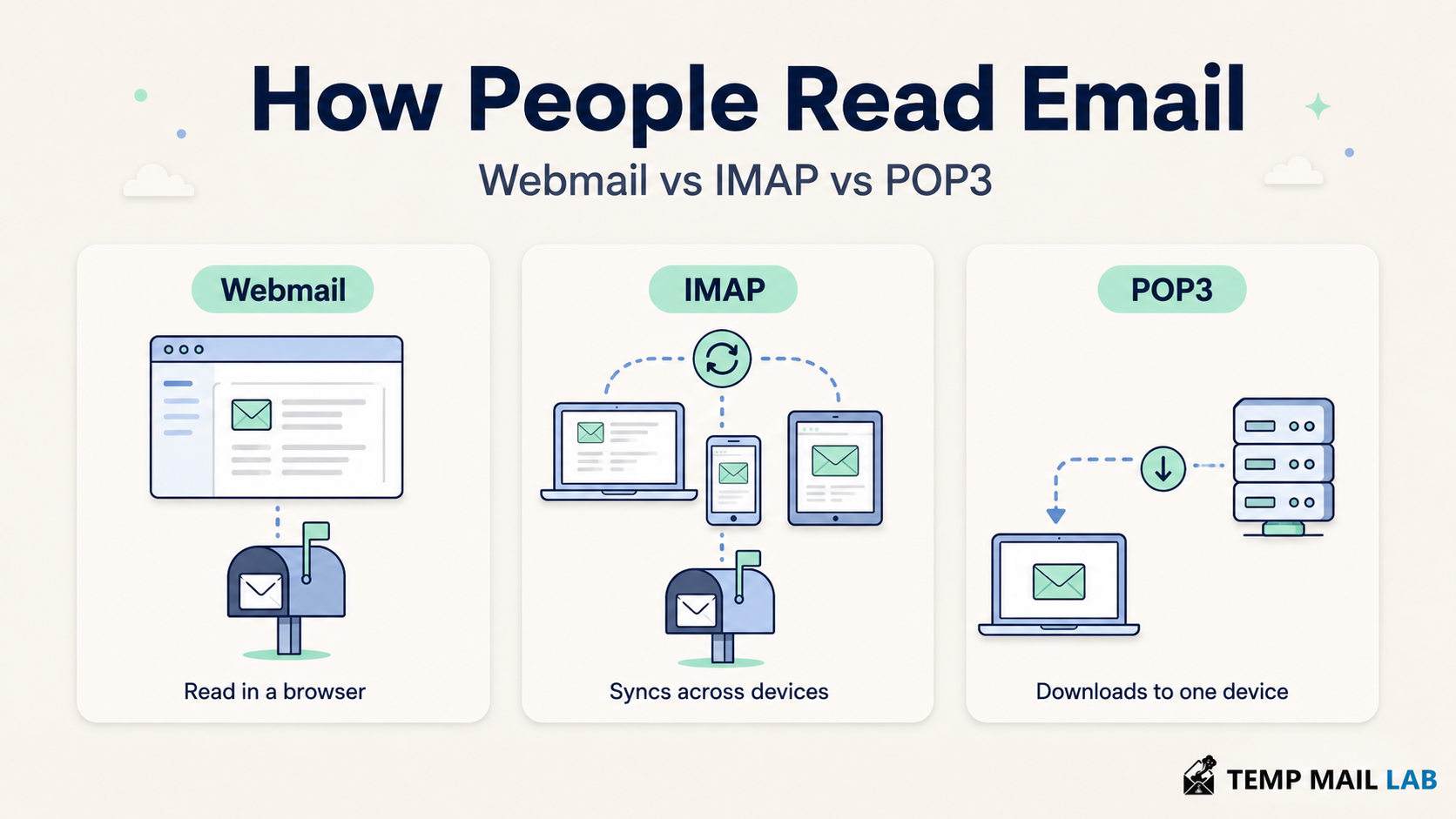
Webmail
With webmail, the user signs in through a browser. The browser communicates with the provider over HTTPS, and the provider displays messages from its own storage system. The user does not normally configure SMTP or IMAP settings manually.
IMAP
IMAP lets a client access and manage messages stored on a server. It supports folders, flags, searches, and synchronization. If you read a message on your phone, move it to a folder on your laptop, or delete it in a desktop client, IMAP can synchronize those changes.
This is why IMAP suits people who use the same mailbox on several devices.
POP3
POP3 gives a client access to messages in a server maildrop and lets it download them. Many clients can be configured to leave copies on the server, but POP3 does not provide the same folder and state synchronization model as IMAP.
POP3 can still work for simple retrieval or local archiving. It is less convenient when several devices need a consistent view of the same mailbox.
SMTP, IMAP, and POP3 compared
SMTP sends or relays messages. IMAP accesses and synchronizes a mailbox on the server. POP3 retrieves messages for local use.
They do not compete for the same job. A desktop client may use SMTP for outgoing mail and IMAP for incoming mail in the same account.
Is email encrypted?
Email can be encrypted in transit without being end-to-end encrypted.
When you use webmail, HTTPS protects the connection between your browser and the provider. A configured mail client should also use TLS when it submits mail or accesses a mailbox through IMAP or POP3.
Mail servers can use TLS while transferring a message to each other. This protects the connection for that hop. MTA-STS lets a receiving domain publish a policy that tells compatible sending servers to require trusted TLS connections.
Transport encryption does not mean that only the sender and recipient can read the message. The email services that process and store the message can still access its content unless a separate end-to-end encryption system protects it.
With end-to-end encryption, the sender encrypts the message so that only the intended recipient has the key needed to decrypt it. Even then, some metadata, including addressing information needed for delivery, may remain visible.
Who can see information about an email?
The answer depends on the providers, apps, settings, and encryption in use.
Your email provider processes the message when you submit it. It knows your account, the recipient address, the time, and technical information about the connection. The recipient's provider receives and stores the message. Intermediate relays, if present, handle it during delivery.
A network operator can see that your device connected to an email service. Proper TLS limits what the operator can read inside that connection. A VPN changes which network IP address the email service sees, but it does not hide the email account you sign in to or remove the addresses inside the message.
The sender of a marketing email may include a remote image or tracked link. Loading that content can tell the sender that the message was opened and may reveal a time, IP address, or device information. Blocking remote images reduces some forms of open tracking, though tracked links can still report a click.
Why do emails get delayed?
Email does not promise instant delivery. A message can be delayed even when the address is correct.
A receiving server may be temporarily unavailable or may ask the sender to try again later. The sending server then keeps the message in its queue and retries according to its policy.
Greylisting can temporarily reject a first delivery attempt to see whether the sending server behaves like a normal mail system and retries. Large attachments, overloaded systems, DNS problems, and extensive security scanning can also add time.
A delay can last minutes or longer. If the sending system eventually gives up, it normally sends a delivery failure notice to the envelope sender.
Why do emails bounce or go to spam?
A permanent delivery failure may occur because the address does not exist, the recipient domain has no working mail service, the mailbox refuses the message, or a policy blocks the sender. A temporary failure may involve a full mailbox, an unavailable server, or a rate limit.
Spam placement is different from a bounce. The receiving provider accepted the message but classified it away from the inbox.
Common signals include poor domain or IP reputation, missing or misaligned authentication, a history of complaints, deceptive content, unsafe links, malware, or sending patterns that resemble abuse. Legitimate mail can also be filtered by mistake.
For senders, the practical response is to authenticate the domain, send only to people who expect the mail, keep complaint rates low, remove invalid addresses, and make subscription messages easy to leave. There is no phrase or formatting trick that guarantees inbox placement.
Where temporary email fits into this system
A temporary email address uses the same basic Internet mail system. Its domain publishes mail routing information, its servers receive messages over SMTP, and its application shows the messages in an inbox.
The difference is in account design and retention. A temporary inbox may require no personal account, may expire after a set period, and may offer limited recovery. Some services use private session access. Others expose inboxes to anyone who knows or guesses the mailbox name.
Temporary email is useful when a site needs an address for a low-risk, short-lived interaction and you do not want to expose your primary inbox. It is a poor choice for banking, government services, paid accounts, important work, or anything that may require recovery months later.
Frequently asked questions
How does an email reach another country so quickly?
The message travels as Internet data between mail servers. SMTP handles the transfer, while DNS tells the sending system which servers accept mail for the recipient's domain. Physical distance can affect network latency, but server processing and filtering can add more visible delay.
Does SMTP receive email?
SMTP transfers and submits email. A receiving mail server accepts incoming messages through SMTP, but users normally read stored messages through webmail, IMAP, or POP3.
Does a delivered email mean it was read?
No. Delivery means the receiving system accepted or placed the message for the recipient. It does not prove that the recipient opened it.
What is the difference between IMAP and POP3?
IMAP manages messages and folders on the server and synchronizes changes across clients. POP3 focuses on retrieving messages from a maildrop for local use and has a simpler synchronization model.
Can an email pass SPF, DKIM, and DMARC and still be dangerous?
Yes. Authentication helps verify domain use. It does not judge every link, attachment, request, or claim in the message. A message from an authenticated lookalike domain can still be a phishing attempt.
Is normal email end-to-end encrypted?
Not usually. Email services can use TLS to protect connections, but transport encryption still allows the services handling the message to process it. End-to-end encryption requires a separate system that keeps the content encrypted between the sender and recipient.
Can a VPN make email anonymous?
No. A VPN can hide your home IP address from the email provider and local network, depending on the setup. It does not hide the account you use, the recipient, the sender address, or the information you include in the message.
How does temporary email receive verification codes?
The website sends the code as a normal email. DNS helps the sending server find the temporary email provider, the provider receives the message over SMTP, and the service displays it in the temporary inbox. Whether the code arrives also depends on the sender's policies and whether it accepts the temporary domain.
Technical references
The email transfer and submission sections follow RFC 5321 and RFC 6409.
The message structure and attachment sections follow RFC 5322 and the MIME specification in RFC 2045.
The mailbox access sections follow RFC 9051 for IMAP and RFC 1939 for POP3.
The authentication sections use the SPF, DKIM, and DMARC specifications.
The transport security sections use RFC 8314 and RFC 8461.