
Educational purpose: This guide explains the topic in clear language to help readers make safer, informed, and lawful choices.
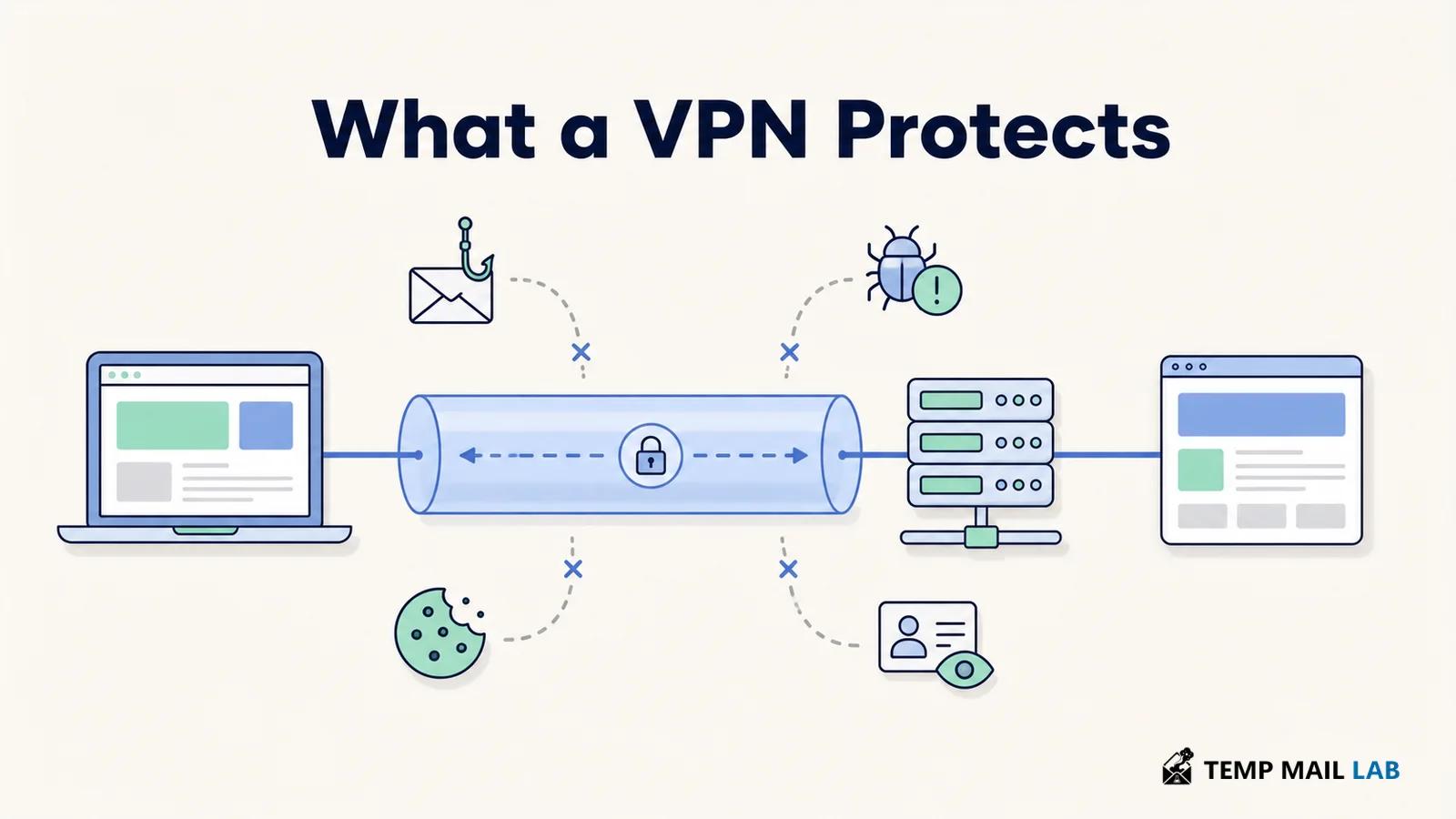
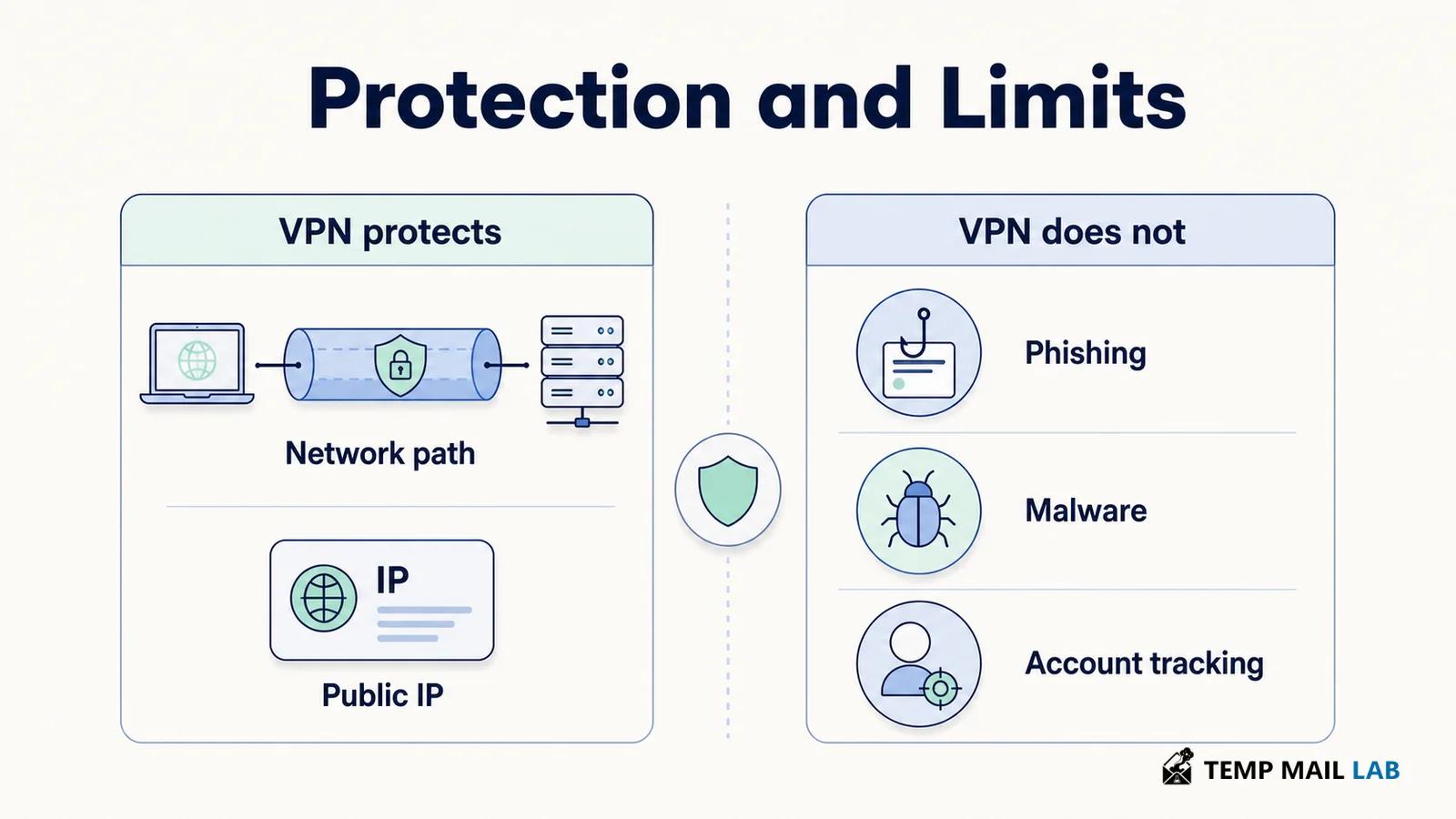
A VPN protects the network path between your device and a VPN server. It can hide your original public IP address from websites and reduce what a local network or internet provider can observe about your destinations. It does not make you anonymous, secure a compromised device, or prevent a service from identifying an account you use.
The useful question is not whether a VPN makes the internet safe. It is whether its specific protection matches the risk you face. A VPN may help on an untrusted network, when limiting provider visibility, or when accessing an authorized private network. Other problems, including phishing, malware, weak passwords, cookies, and data you submit yourself, require different controls.
How a VPN works
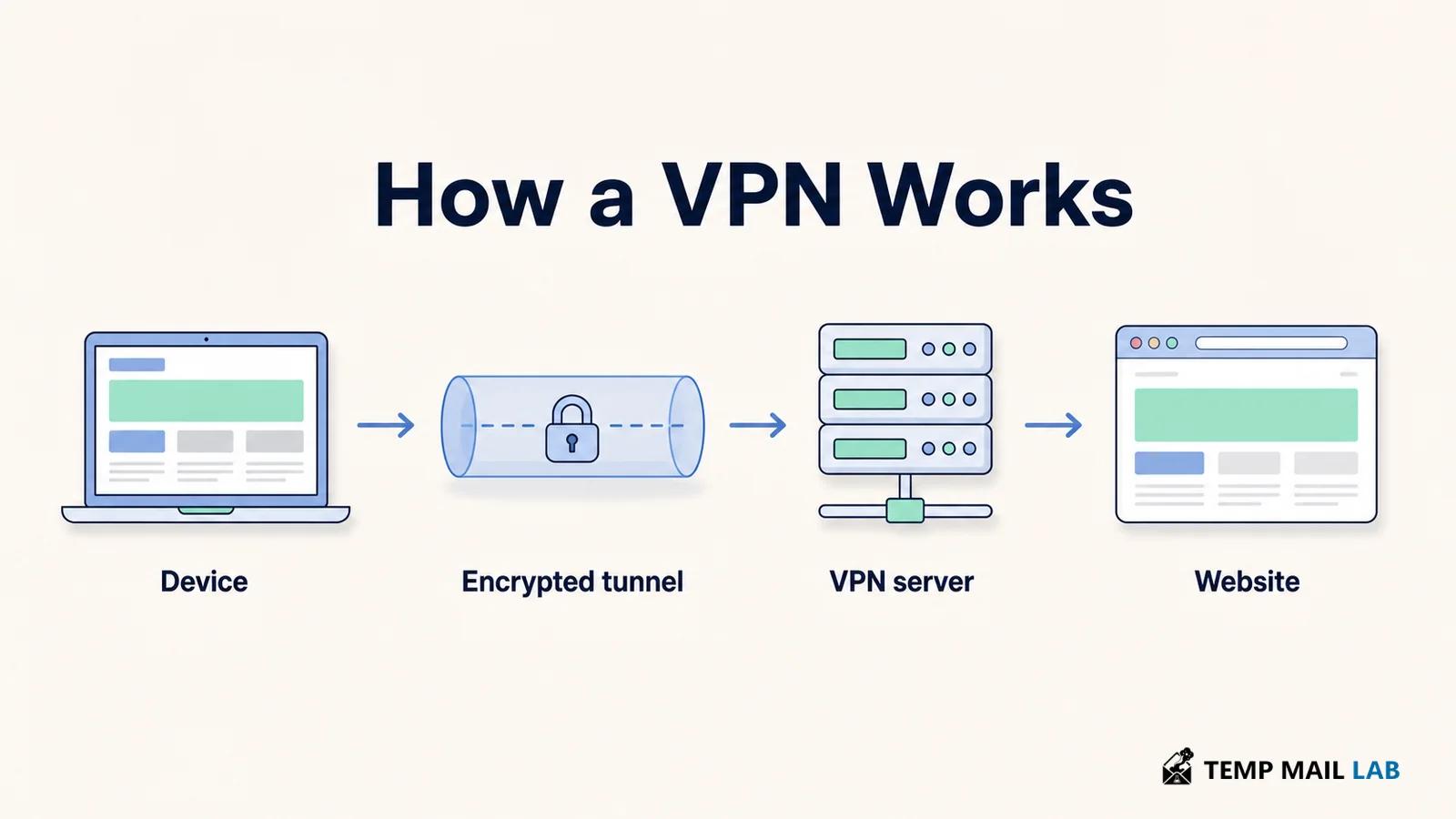
A VPN app creates an encrypted tunnel from your device to a VPN server. Traffic covered by the app travels through that tunnel before continuing to its destination. IPsec is one established framework for protecting communications at the network layer. NIST's IPsec VPN guidance explains how IPsec can provide private communications over IP networks. Other VPN designs may use different protocols, so a property of IPsec should not be assumed to apply to every VPN implementation.
The internet provider or local network can usually see that your device connected to a VPN server. It can also observe facts such as connection time, duration, and traffic volume. It no longer has the same direct view of each destination carried inside a correctly configured tunnel. The VPN provider, however, operates the server where that tunnel ends. Using a VPN therefore changes which party is in a position to observe parts of the connection.
Coverage depends on configuration. Split tunneling sends selected traffic outside the VPN, while other settings route nearly everything through it. A dropped connection can expose new traffic unless the app blocks network access or reconnects safely. Check the provider's documentation and device settings instead of assuming that a VPN icon means every application and DNS request follows the same route.
HTTPS provides a separate protected channel between your browser or app and the destination. When VPN traffic reaches the VPN server, the VPN layer ends, but HTTPS continues to the website. The current TLS 1.3 specification, RFC 9846, defines a channel designed to resist eavesdropping, tampering, and message forgery. If an app uses an unencrypted protocol, traffic beyond the VPN server may be readable on the remaining route.
What a VPN protects
Traffic on a local network
A VPN can prevent the operator of a coffee shop, hotel, airport, or other local network from reading traffic inside the tunnel. It may also hide destination information that would otherwise be available to that operator. This is useful when you do not know who manages the network or do not trust its configuration.
Public Wi-Fi is not automatically exposing every password or page. HTTPS already encrypts the contents of most web connections. A VPN adds coverage at the network level and can protect traffic from multiple applications, but it does not make a fake hotspot or malicious login portal trustworthy. If a public network behaves unexpectedly, avoid sensitive activity until you can use a connection you trust.
Some visibility from an internet provider
Without a VPN, an internet provider can observe connection metadata and may identify or infer services you use. With a VPN, it sees the connection to the VPN server instead of the same set of individual destination connections. Timing, volume, and the VPN server's address remain visible. Traffic that bypasses the VPN because of settings, split tunneling, or a connection failure may also remain exposed to the provider.
Your original public IP address
Websites normally receive the public IP address used to reach them. A VPN substitutes its server's address, which reduces exposure of your original IP and its approximate location. This can also make connections from different networks appear to come from one VPN endpoint.
An IP address is only one identifying signal. A website may still recognize an account, cookie, device characteristic, GPS permission, or information entered in a form. Changing the visible IP address does not erase those signals or change what a logged-in service knows about you.
Access to an authorized private network
Organizations use VPNs to let approved users reach internal systems from outside the office. In this case, the VPN is an access and network protection tool rather than an anonymity service. The organization may authenticate users, restrict available resources, and log activity according to its security policies.
What a VPN does not protect
Phishing, malware, and account compromise
A VPN can carry an encrypted connection to a fraudulent website. If that page persuades you to enter a password or payment information, network encryption does not judge whether the recipient is honest. NIST's phishing guidance recommends verifying suspicious requests through known contact information, maintaining security software, and using multifactor authentication.
A conventional VPN is not antivirus software. It does not remove malicious code, repair a vulnerable application, or make an unsafe download harmless. Some providers include separate domain blocking or scanning features, but those features need their own evaluation. Operating system and application updates, careful downloads, and appropriate device security still matter.
The same limit applies to accounts. A VPN cannot make a reused password safe or stop an attacker who already has valid credentials, an active session, or control of the device. Unique passwords or passkeys and strong multifactor authentication address account access. They solve a different problem from network routing.
Cookies, fingerprinting, and data you provide
A website can recognize a cookie even when your IP address changes. Browser settings, device characteristics, tracking pixels, and advertising identifiers provide additional signals. The FTC's consumer guidance on online tracking describes these methods, while this site's guide explains more about what information websites can collect.
Signing in gives a service a direct account identifier. A VPN does not hide activity from that service while you use the account. It also cannot protect information you deliberately send, such as a name, search query, file, location, or payment detail. Encryption protects data in transit. The recipient can still store and process the data after it arrives.
The VPN provider
The VPN provider becomes a sensitive part of the connection path. Its technical visibility depends on the protocol, app design, configuration, and whether the destination uses HTTPS. The provider may also collect connection records or account information according to its systems and policies.
The EFF guide to choosing a VPN warns against treating a VPN as an anonymity tool and recommends examining claims, ownership, business model, audits, and data collection. A no-logs statement is a claim, not proof by itself. The practical question is whether the provider collects information that matters to your risk and whether its public evidence supports its promises.
VPN vs HTTPS and private browsing
VPN
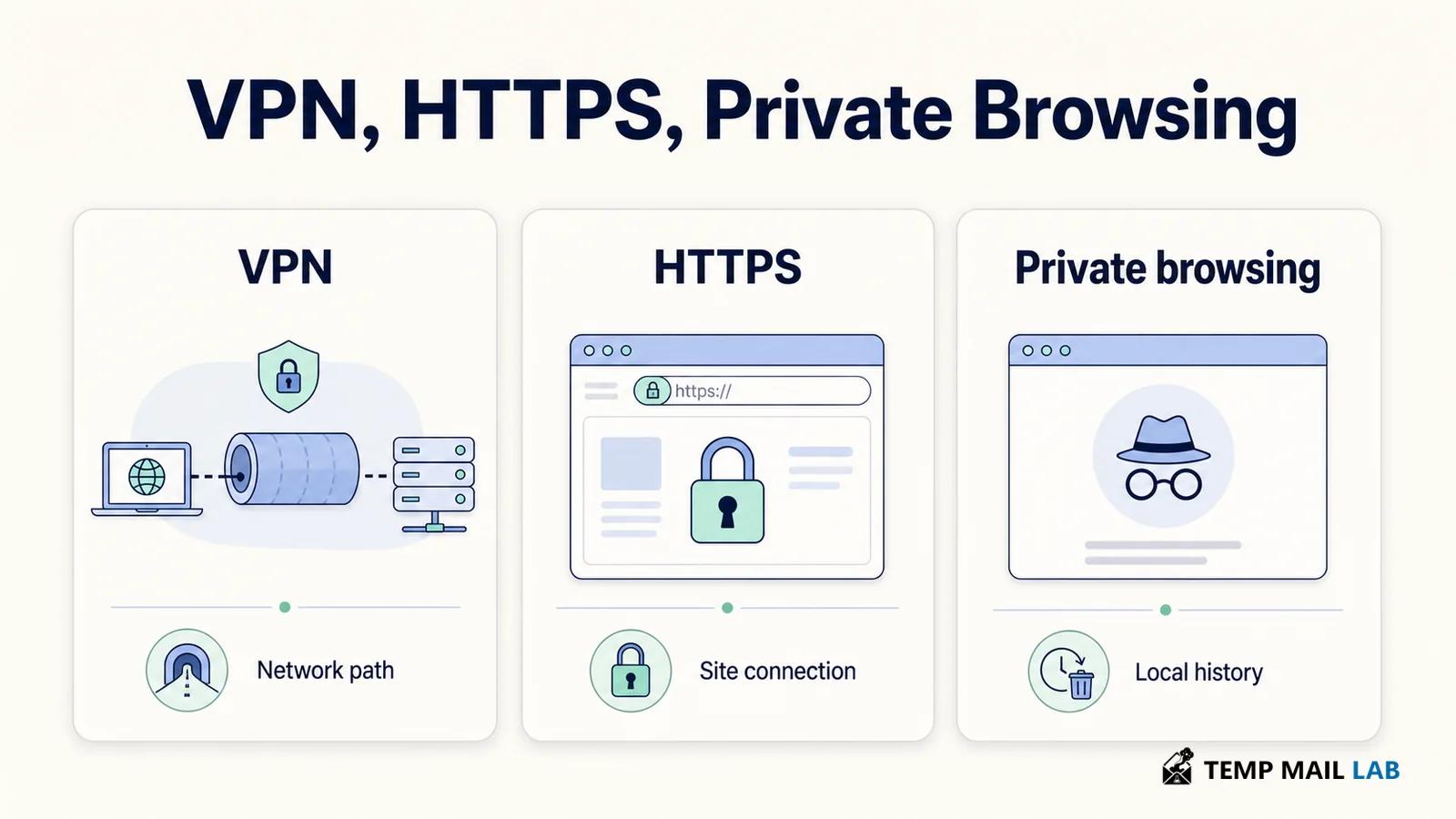
A VPN protects routed traffic between your device and the VPN server. It changes the public IP address seen by destinations and can limit what the local network or internet provider observes. It does not control how a destination handles data after receiving it.
HTTPS
HTTPS protects communication between an app or browser and a website. It helps prevent parties on the route from reading or altering protected content and allows the client to authenticate the server through certificates. It does not stop the website from collecting information that you send or generate while using the service.
Private browsing
Private or incognito mode mainly controls local browser storage. It can isolate some session data and remove local history when the private window closes. It does not hide your IP address from websites or conceal the connection from an internet provider, employer, school, or VPN provider.
When using a VPN makes sense
A VPN is useful when you can name the network risk it addresses. Reasonable cases include using a network whose operator you do not trust, reducing destination visibility to a local network or internet provider, preventing websites from receiving your original public IP address, and connecting to an authorized work, school, or home network.
Not everyone needs a personal VPN running at all times. HTTPS already protects most web content in transit, and a VPN may add latency, trigger additional verification, or interfere with some services. It also transfers part of your trust to the VPN provider. Decide based on the information you want to protect, the parties you are concerned about, and the other controls already in place.
How to evaluate a VPN provider
If a VPN fits your needs, focus on a few points. Read the privacy policy for the exact data collected, why it is collected, how long it is retained, and when it is shared. Identify the company that operates the service and how the service is funded. Free does not automatically mean unsafe, and paid does not prove privacy.
Look for recent public security audits that cover both the apps and infrastructure, while remembering that an audit describes a point in time. Check whether the software receives security updates, which protocols it supports, and what permissions the app requests. Install it only from a verified source. Treat promises of total anonymity, complete tracking prevention, or protection from every hacker as warning signs.
Match the tool to the risk
Use a VPN to protect the route to a trusted VPN server, limit what a network provider can observe, or keep your original public IP address from a destination. Do not rely on it to detect fraud, clean an infected device, secure a weak account, or erase information you choose to provide.
A sound decision starts with the threat. VPN protection covers a network layer. HTTPS protects communication with a destination. Account controls protect sign-ins, and device updates address vulnerable software. Keeping those roles separate prevents a VPN from creating a false sense of security.